What Is dbt, and Why Do Analytics Engineers Love It?
A tool built almost entirely out of SQL and YAML somehow became the single most-loved piece of the modern data stack. Here's what dbt actually does, and why it earned that reputation.
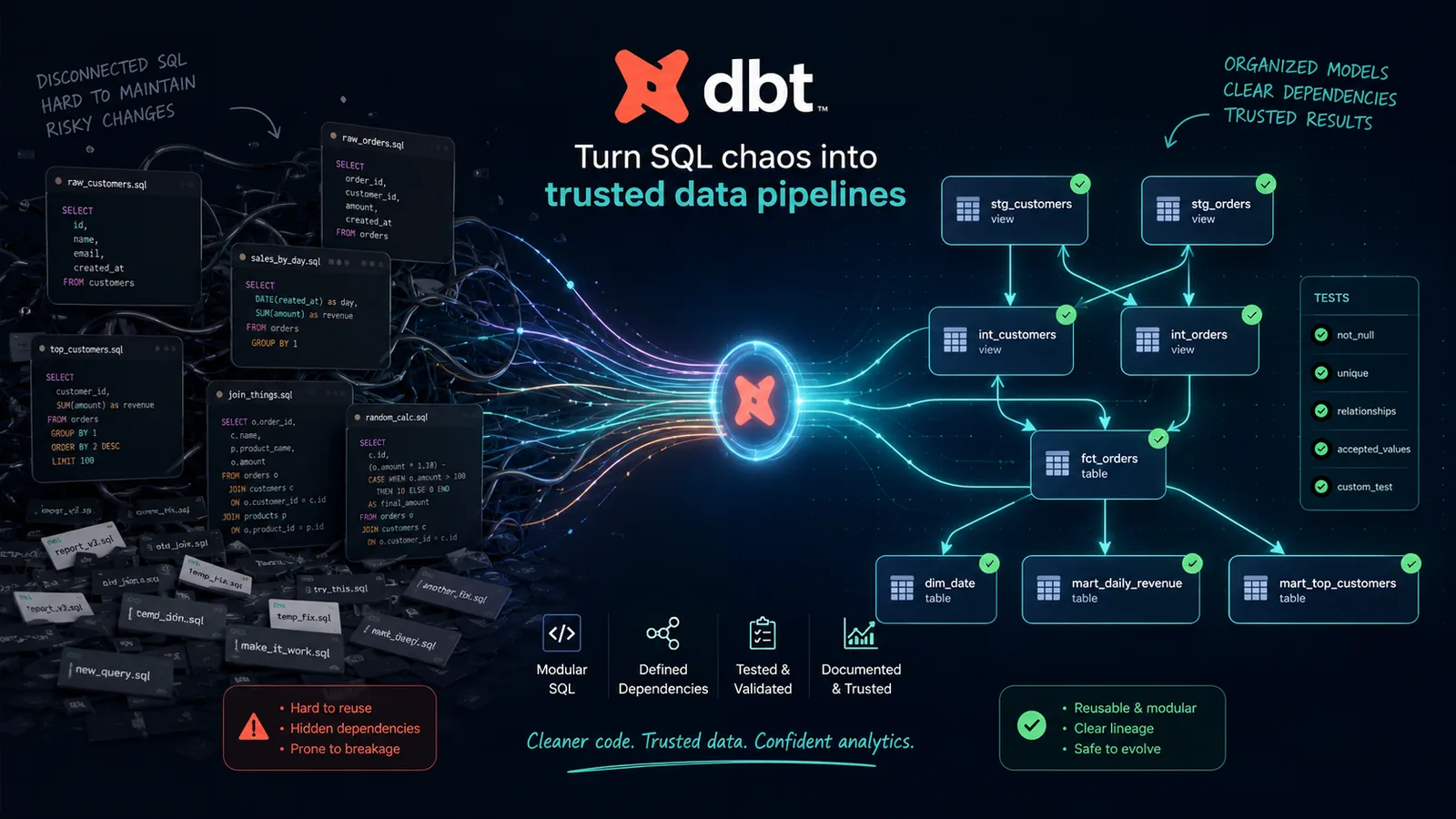
Ask almost any analytics engineer what tool changed their working life the most, and you'll get the same one-word answer with suspicious consistency: dbt. Not a cloud platform, not a BI tool, not a shiny new AI feature — a command-line tool built almost entirely out of SQL and a bit of YAML, created by a small team who were tired of watching transformation logic rot inside tangled stored procedures and one-off scripts nobody could safely touch.
That's a strange thing for a piece of software to inspire this much genuine affection. Most data tools get tolerated. dbt gets defended, recommended, and built entire job titles around. This article is an introduction to what dbt actually is, how it works under the hood, and — the more interesting question — why it's earned the kind of loyalty from analytics engineers that most enterprise software never comes close to.
What dbt Actually Is
dbt stands for "data build tool." At its core, it's a command-line tool (also available as a managed cloud product) that lets you write your data transformations as plain SQL SELECT statements, and then handles everything around running them properly: figuring out the right order to run them in, creating the tables or views in your warehouse, testing the results, and generating documentation — all without you writing a single line of orchestration code by hand.
It's important to be precise about what dbt is not. It doesn't extract data out of source systems, and it doesn't load data into your warehouse. That part — the "EL" in ELT — is handled by other tools (Fivetran, Airbyte, custom scripts, and so on). dbt picks up after the raw data has already landed in a warehouse like Snowflake, BigQuery, Redshift, or Databricks, and takes care of the "T": transforming that raw, messy data into clean, trustworthy, well-structured datasets that analysts, dashboards, and downstream tools can actually rely on.
In other words: dbt is the transformation layer, and specifically, it's a transformation layer that treats SQL the way software engineers treat application code — version-controlled, tested, documented, and reviewed before it ever touches production.
Before dbt: What This Work Looked Like
To understand why dbt resonates so strongly, it helps to picture what analytics teams were doing before it existed — and in plenty of organizations, what they're still doing today.
Transformation logic lived in one of a few uncomfortable places: buried inside enormous, unreadable stored procedures with no ownership history; scattered across a graveyard of scheduled scripts nobody was quite sure were still needed; or duplicated silently across a dozen different BI tool calculated fields, each one drifting slightly out of sync with the others. Nobody could say with confidence which version of "monthly active users" was correct, because there were four different SQL definitions of it, hidden in four different places, written by four different people who'd since left the company.
There was no real way to test a transformation before it shipped. There was no dependency graph, so nobody could safely answer "if I change this table, what breaks downstream?" without just trying it and hoping. There was no documentation beyond a comment someone half-remembered to add three years ago. Changes went straight to production because there was no realistic way to review SQL sitting inside a stored procedure the way you'd review a pull request.
This wasn't a tooling gap so much as a missing discipline — the data world simply hadn't adopted the practices software engineering had been using for decades. dbt's real innovation wasn't inventing new technology; it was importing software engineering discipline into a world that had been operating without it.
How dbt Actually Works
The mental model is simpler than people expect. A dbt project is just a folder of .sql files, each one called a model. Each model is a single SELECT statement that defines one table or view. You don't write CREATE TABLE statements yourself — dbt handles that translation based on how you've configured the model.
Here's a simplified example of what a single dbt model file might look like:
-- this model builds a clean, analysis-ready orders table
WITH orders AS (
    SELECT * FROM {{ ref('stg_orders') }}
),

customers AS (
    SELECT * FROM {{ ref('stg_customers') }}
)

SELECT
    orders.order_id,
    orders.order_date,
    orders.order_total,
    customers.customer_id,
    customers.customer_region
FROM orders
LEFT JOIN customers USING (customer_id)
Notice the {{ ref('stg_orders') }} syntax instead of a hardcoded table name. That single detail is doing a lot of quiet, important work, which is worth its own section below. When you run dbt run, dbt reads every model in the project, figures out which ones depend on which others, and executes them all in the correct order — building an entire warehouse's worth of clean, structured tables from nothing but a folder of readable SQL files.
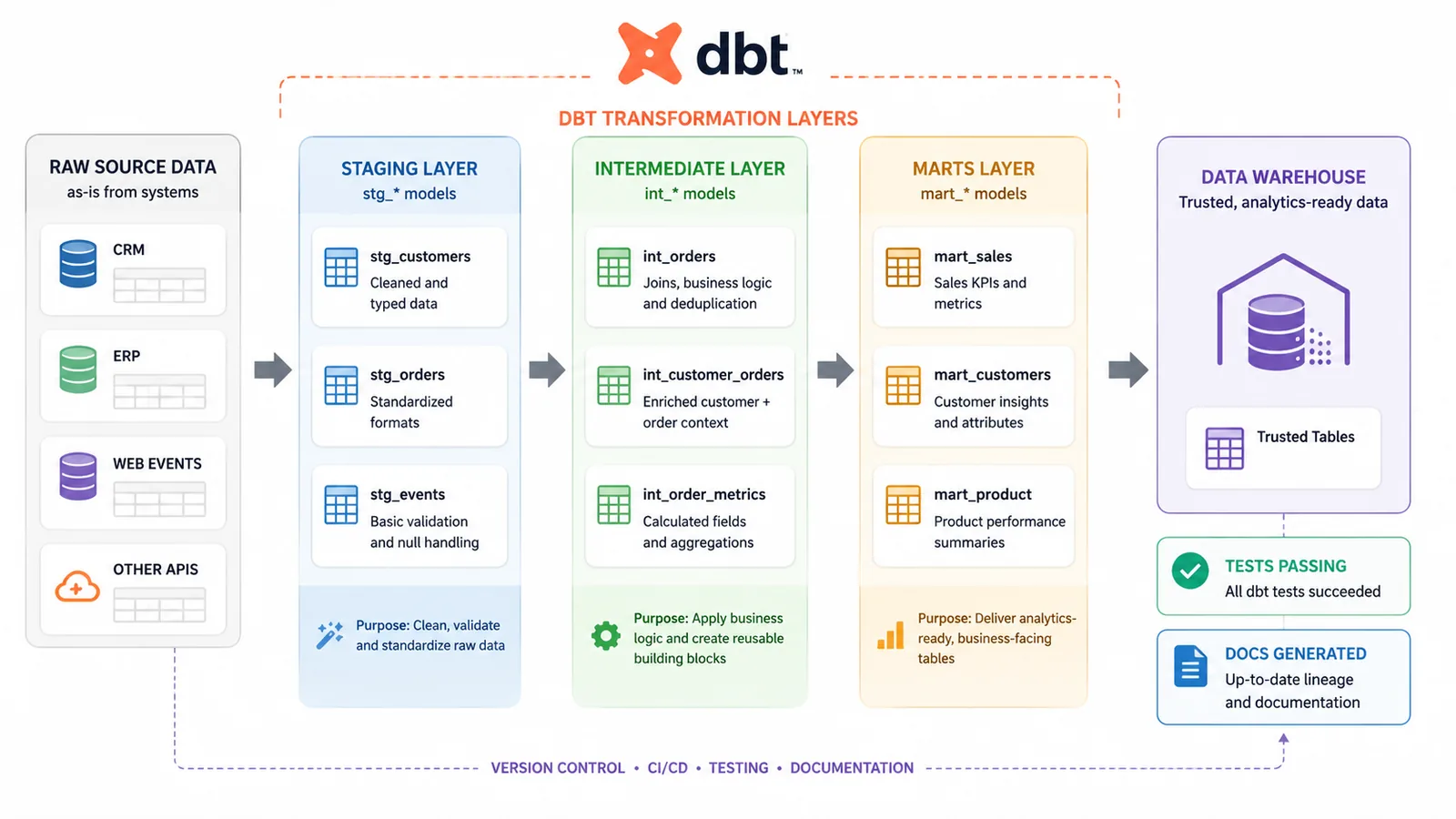
Alongside models, a dbt project typically includes YAML files that define tests (rules that check the data actually looks the way it's supposed to), sources (a record of where raw data comes from), and documentation (descriptions of what each model and column actually means). All of it lives in the same project, in the same version control repository, reviewed the same way application code is reviewed.
SQL Stops Being a Script and Becomes Real Software
The single biggest shift dbt introduced is treating a collection of SQL queries as an actual software project rather than a pile of disconnected scripts. A dbt project lives in Git. Changes go through pull requests. Someone else reviews the diff before it merges. There's a clear history of who changed what, when, and — because commit messages exist — why.
This sounds almost too basic to be worth celebrating, and that's exactly the point. Analytics engineers love it because it's the bare minimum every other engineering discipline has had for years, finally applied to the SQL that businesses actually run on. Before this became standard, a bad transformation change could silently break a revenue dashboard with zero paper trail and zero opportunity for a second pair of eyes to catch it first.
The ref() Function and the Dependency Graph
That ref() function from the earlier code example is arguably dbt's single most important idea. Instead of hardcoding a table name like analytics.stg_orders, you write {{ ref('stg_orders') }}, and dbt resolves that reference for you at run time.
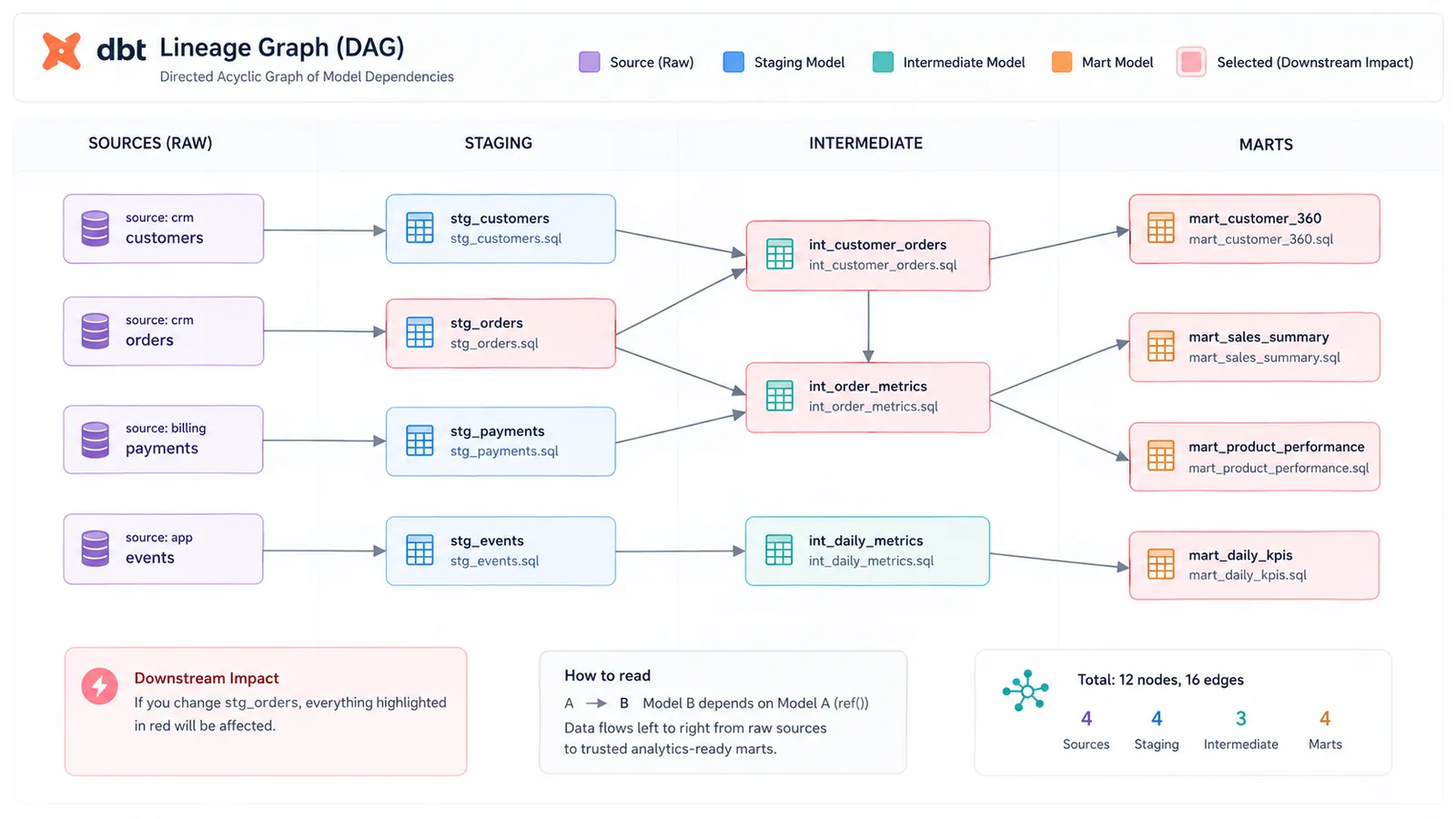
Because every model declares its dependencies this way instead of through hardcoded names, dbt can automatically build a complete dependency graph — technically a DAG, or directed acyclic graph — of your entire project. It knows, with certainty, that fct_orders depends on stg_orders and stg_customers, and it knows that before either of those can run, whatever feeds them needs to run first.
This has two enormous practical benefits. First, dbt can run your entire project in the correct order automatically — you never have to manually sequence forty scripts by hand again. Second, and just as important, you get a real, visual answer to "if I change this model, what else does it touch?" That question used to require tribal knowledge or a very stressful afternoon of grepping through scripts. Now it's a diagram dbt generates for you.
Testing Is Built Directly Into the Workflow
Before dbt, "testing" a data transformation usually meant eyeballing a few rows in the output and hoping nothing looked obviously wrong. dbt made data testing a first-class, almost trivially easy part of the workflow, right alongside the model definitions themselves.
A large share of the tests analysts actually need come built in and take one line of YAML to add:
models:
  - name: fct_orders
    columns:
      - name: order_id
        tests:
          - unique
          - not_null
      - name: customer_id
        tests:
          - not_null
          - relationships:
              to: ref('dim_customers')
              field: customer_id
Run dbt test, and dbt checks every rule across the whole project — no duplicate order IDs, no unexpected nulls, no orphaned foreign keys pointing at customers that don't exist — and tells you exactly which rows in which models failed. For anything more specific to the business, you can write fully custom SQL-based tests too.
This is the feature analytics engineers bring up unprompted more than any other. It turns "I think this dashboard number is probably right" into "this number passed forty automated checks before it was allowed anywhere near production," and that difference in confidence is exactly what the role of analytics engineering was created to provide.
Documentation That Writes Itself
Documentation is the part of every engineering discipline that everyone agrees matters and almost nobody keeps up to date, because it lives separately from the code and rots the moment nobody's looking. dbt closes that gap by generating a full, searchable documentation site directly from the project itself — descriptions, column definitions, the dependency graph, and test coverage, all in one place, updated automatically every time the project changes.
Because descriptions live in the same YAML files as the tests and model configuration, updating documentation isn't a separate chore someone has to remember to do later — it's part of the same pull request as the change itself. That single design decision is a big part of why dbt documentation actually stays current in a way most data documentation historically never has.
Real Version Control and Real Collaboration
Because a dbt project is just a folder of files, it lives naturally inside Git like any other codebase. That unlocks everything software teams already take for granted: pull requests, code review, branching for experimental changes, a full history of exactly who changed a given model and why, and the ability to safely roll back a bad change in seconds instead of trying to reconstruct what the SQL used to look like from memory.
For analytics engineers, many of whom come from backgrounds in analytics or operations rather than formal software engineering, this is often the first time their day-to-day work has felt like it belongs to an established, disciplined craft rather than a pile of ad hoc scripts held together by hope. That shift in how the work feels is a real part of why the role and the tool are so tightly associated with each other.
It Encourages Clean, Modular, DRY SQL
Anyone who's worked with legacy SQL has seen the same 200-line query copy-pasted into six different reports, each with slightly different tweaks, all quietly drifting out of sync with each other over time. dbt's whole structure pushes against that instinct. Because any model can reference any other model through ref(), you naturally end up breaking logic into layers: staging models that do light cleanup on raw source data, intermediate models that handle shared business logic, and mart models that assemble the final, analysis-ready tables analysts and dashboards actually query.
Define "active customer" once, in one staging or intermediate model, and every downstream model that needs that definition simply references it instead of reimplementing it. If the business definition changes, you update it in exactly one place, and every dependent model picks up the change automatically the next time it runs. That's the DRY principle — Don't Repeat Yourself — a concept software engineers have relied on for decades, applied to analytics SQL for what is, for many teams, the first time.
It Effectively Created — and Named — a New Career Path
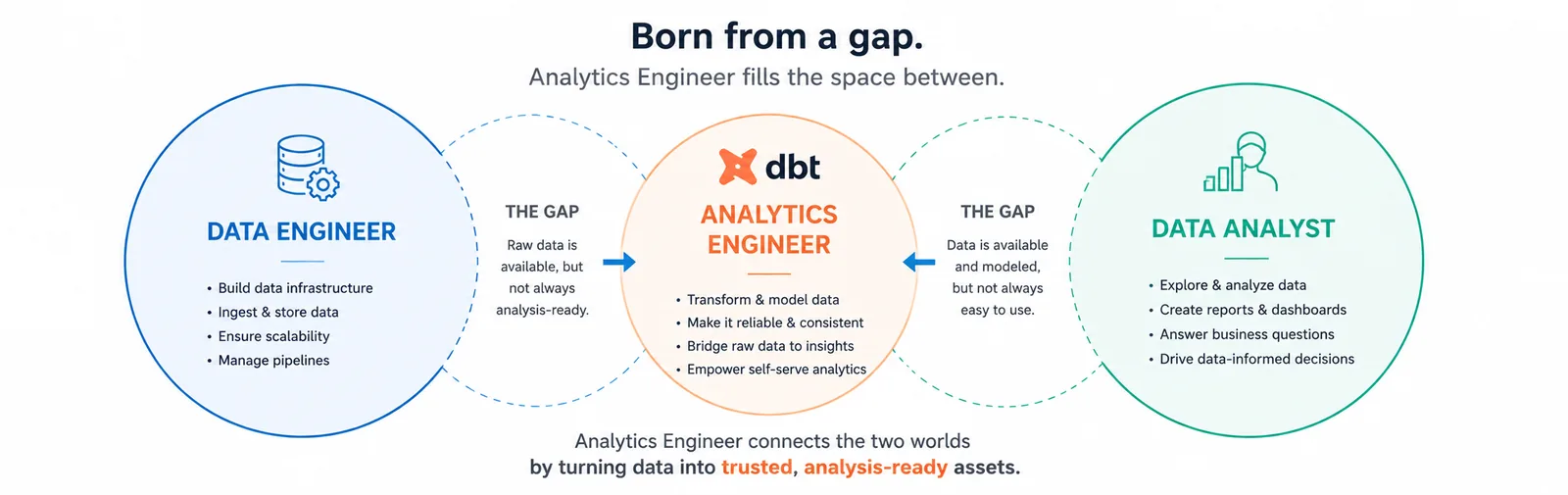
This is the part that's easy to underestimate if you weren't around before it happened: the title "Analytics Engineer" barely existed as a distinct, widely recognized role before dbt. The work itself — modeling raw data into clean, trustworthy datasets — had always existed in some form, usually split awkwardly between data engineers who didn't want to own business logic and analysts who didn't have the tooling to own it properly either.
dbt gave that gap a name, a toolkit, and a clear set of responsibilities, and the role grew rapidly once it did. It's a role that specifically rewards people who are good at structuring and organizing messy information — which is a big part of why it's become such an accessible entry point for career switchers coming from operations, finance, or accounting backgrounds, on top of being a strong next step for data analysts who already know SQL well and want to move closer to the engineering side of the data organization.
The Ecosystem That Grew Up Around It
Part of dbt's staying power is that it didn't stay a single, static tool. A large open-source package ecosystem grew around it, letting teams share reusable logic instead of reinventing it — packages for common transformations, testing utilities, and integrations with nearly every major cloud warehouse.
dbt Cloud, the managed offering, added scheduling, a hosted documentation site, an in-browser IDE, and CI/CD checks that automatically run tests against every pull request before it can merge — turning "did this change break anything downstream" from a manual worry into an automated gate. More recently, capabilities like a semantic layer have extended dbt's reach beyond just building tables, toward defining consistent business metrics ("revenue," "active users") in one place so that every BI tool and every team pulls the exact same number, calculated the exact same way, instead of quietly disagreeing with each other.
| Concept | What it means in dbt |
|---|---|
| Model | A single SQL SELECT statement that defines one table or view |
| ref() | A function that declares a dependency between models, powering the DAG |
| Source | A reference to a raw table loaded by an external tool, tracked for freshness |
| Test | A rule (built-in or custom SQL) that checks data quality automatically |
| Materialization | How a model gets built — as a view, table, incremental table, and more |
| Seed | A small static CSV file loaded into the warehouse via dbt |
| Package | Reusable dbt code shared across projects, installed like a library |
Getting Started With dbt
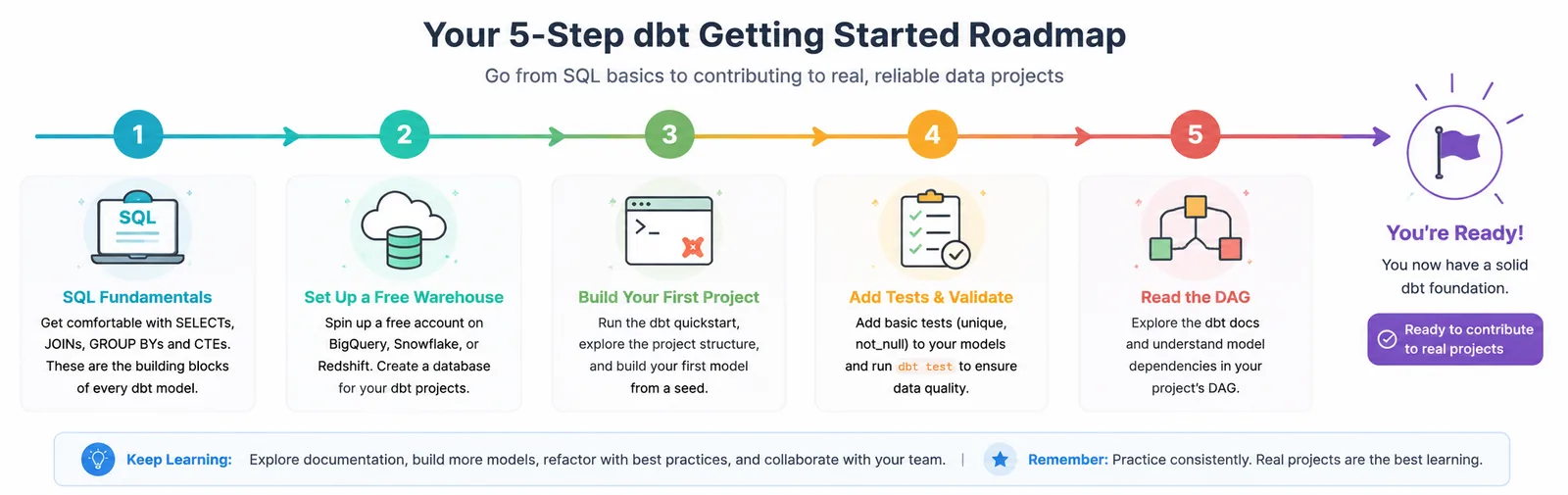
If any of this has made you curious enough to actually try it, the good news is that dbt is genuinely approachable for anyone who already has a working grasp of SQL — which is exactly why it's such a natural next step after mastering the fundamentals covered in an introduction to SQL for data analysts.
Make sure your SQL fundamentals are solid first. dbt doesn't teach you SQL — it organizes SQL you already know how to write. Joins, CTEs, and aggregation should feel comfortable before you start.
Start with dbt Core and a free-tier warehouse. dbt Core is open-source and free; pair it with a free trial or free tier of Snowflake, BigQuery, or DuckDB to have somewhere real to build models against.
Follow the official quickstart with a public dataset. Work through building staging models, then a couple of marts, on top of a small public dataset rather than jumping straight into a complex real-world project.
Add tests before you add more models. It's tempting to keep building; resist that and get comfortable adding unique, not_null, and relationships tests early, since that habit is most of what makes dbt valuable in the first place.
Practice reading a DAG, not just building one. Spend time in the lineage graph tracing how a change to one staging model ripples downstream — that instinct is what separates someone who's used dbt from someone who actually thinks in dbt.
Free places to start
- The official dbt quickstart guides — free, walk through a full first project end to end
- dbt's own free on-demand courses, covering fundamentals through advanced modeling patterns
- Public dbt project repositories on GitHub — genuinely useful for seeing how real teams structure staging, intermediate, and mart layers
- The dbt Community Slack — active, welcoming, and a good place to ask beginner questions without judgment
The Bottom Line
dbt didn't invent SQL, testing, version control, or documentation. What it did was bring all four of those already-proven ideas into one coherent, approachable workflow, aimed squarely at the part of the data stack that had been operating without them for far too long. That combination — familiar SQL, wrapped in real software engineering discipline — is exactly why it resonates so strongly with the people who use it every day.
For analytics engineers specifically, dbt isn't just a tool sitting in their stack; it's close to the job description itself. And for anyone earlier in a data career — an analyst who wants to grow toward the engineering side, or someone considering analytics engineering as a starting point altogether — it's one of the more approachable, well-documented, genuinely enjoyable tools to learn next, precisely because it rewards SQL skill you may already have rather than demanding you start over with something unfamiliar.
— This article is part of an ongoing tooling series on techedge.in. Questions about setting up your first dbt project? Drop a comment, I read every one.
One email, every other week.
New posts on data engineering, applied AI, and the business decisions around them. No noise, unsubscribe anytime.
Comments
All comments are reviewed before they appear publicly — this keeps spam out.
Loading comments…