Orchestrating dbt with Airflow: DAG Patterns and Configuration That Hold Up
Five ways to run dbt from an Airflow DAG, the configuration on both sides that makes them cooperate, and the concurrency, retry, and CI decisions nobody writes down until something breaks at 3am.
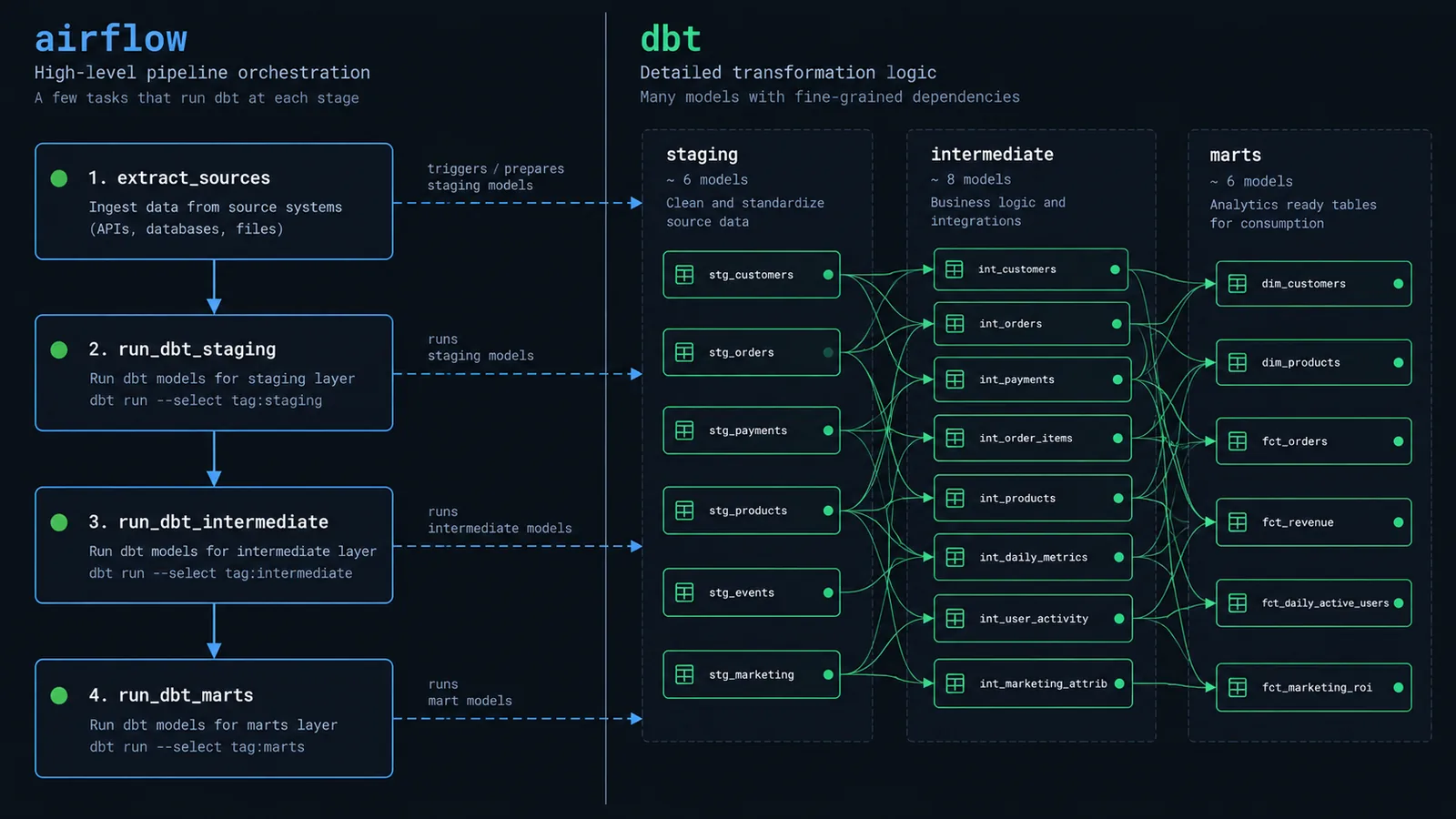
There's a version of this setup that every data team builds first. One Airflow task, one BashOperator, one line: dbt build. It works, it ships, and for about eight months it's completely fine. Then the project has four hundred models, the nightly run takes ninety minutes, a single model fails at minute eighty-three, and someone on call has to decide whether to re-run the whole thing or hand-craft a --select statement at two in the morning.
That moment is where most Airflow-and-dbt architecture decisions actually get made, usually badly, usually under time pressure. The goal of this article is to make those decisions in advance instead.
We'll go through the five orchestration patterns teams actually use, in order of increasing granularity, with the trade-offs of each. Then the configuration that makes any of them work: dbt_project.yml, profiles.yml, selectors and tags on the dbt side; schedules, retries, pools and assets on the Airflow side. Then the parts people discover late — how thread counts interact with task parallelism, how to retry only what failed, how to make CI test just the models that changed, and the handful of mistakes that account for most of the pain.
Where Airflow and dbt Disagree
Both tools model work as a DAG. That sounds like it should make integration trivial, and it's precisely why integration is awkward: you have two DAGs describing overlapping work, and you have to decide which one is in charge.
dbt's DAG is derived. You never declare dependencies; they're inferred from ref() calls at compile time, and dbt recalculates the graph on every invocation. Airflow's DAG is declared. You write the dependencies in Python, the scheduler parses that file on a loop, and the structure is fixed until you change the code.
That difference drives everything. If Airflow only knows about "the dbt task," it can't retry a single model, can't show you which model failed without opening logs, and can't run two unrelated branches of your dbt project in parallel. But if Airflow knows about every single model, you now have two representations of the same graph that must be kept in sync, and the sync mechanism becomes a piece of production infrastructure with its own failure modes.
There's also a scheduling mismatch. dbt has no concept of time — it builds what you select, now. Airflow is built around scheduled intervals, backfills, and logical dates. Bridging that means deciding how (or whether) dbt learns about the run's logical date, which usually lands in --vars.
One thing worth settling before you start: Airflow 3 moved several imports. BashOperator now lives in the standard provider, the TaskFlow decorators come from airflow.sdk, and Dataset was renamed to Asset. The examples here use the Airflow 3 form; on 2.x the concepts are identical and only the import paths differ.
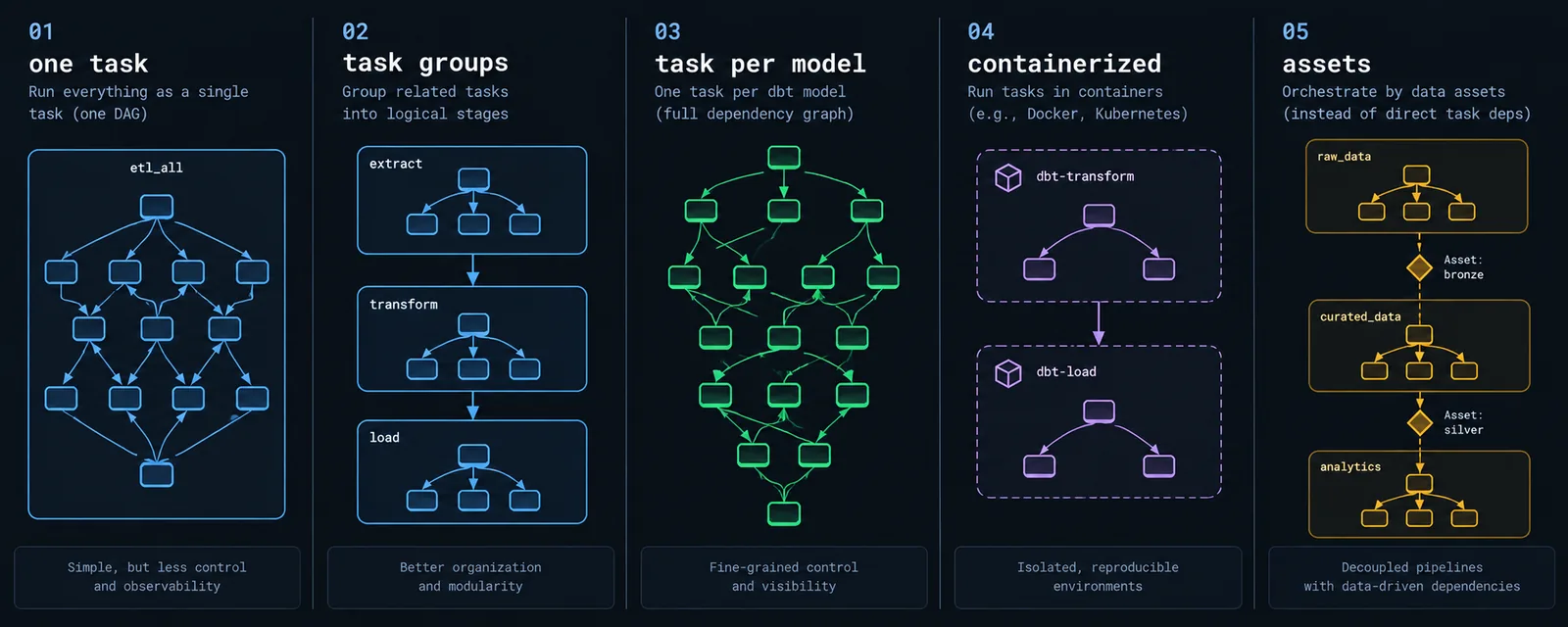
One Task, One dbt Build
The simplest integration, and genuinely the correct answer more often than the internet suggests. Airflow treats the entire dbt project as a single unit of work and doesn't try to understand its internals.
from datetime import datetime, timedelta
from airflow.sdk import dag
from airflow.providers.standard.operators.bash import BashOperator

DBT_DIR = "/opt/airflow/dbt/analytics"

@dag(
    dag_id="dbt_analytics_daily",
    schedule="0 3 * * *",
    start_date=datetime(2026, 1, 1),
    catchup=False,
    max_active_runs=1,
    default_args={
        "retries": 1,
        "retry_delay": timedelta(minutes=5),
        "execution_timeout": timedelta(hours=2),
    },
    tags=["dbt", "analytics"],
)
def dbt_analytics_daily():

    BashOperator(
        task_id="dbt_build",
        bash_command=(
            f"cd {DBT_DIR} && "
            "dbt build --target prod --selector daily_marts "
            "--vars '{\"run_date\": \"{{ ds }}\"}'"
        ),
        env={"DBT_PROFILES_DIR": DBT_DIR},
        append_env=True,
    )

dbt_analytics_daily()
Three details in there matter more than they look. dbt build rather than dbt run && dbt test interleaves tests with models, so a failing test on a staging model stops downstream models from building on bad data rather than testing everything after the damage is done. --selector points at a named selector in selectors.yml instead of inlining selection logic into a Python string. And append_env=True keeps the rest of the environment — without it you'll spend an afternoon debugging a missing PATH.
use it for
- Projects under roughly a hundred models, where a full build finishes in a window you're happy to re-run wholesale.
- Teams without dedicated platform support — this pattern has essentially no moving parts to maintain.
- Any project where dbt's own logs are an acceptable debugging surface.
where it breaks down
Airflow's UI shows you one green or red box. Which model failed, how long each took, what ran and what got skipped — all of it lives in task logs you have to read. Retries restart the whole build. And since the run is one task, it holds one worker slot for its entire duration regardless of how much of that time is spent waiting on the warehouse.
Task Groups by Layer or Domain
The middle ground, and the pattern most mid-sized teams settle on. Instead of one task or four hundred, you get somewhere between three and fifteen — each one a dbt build over a meaningful slice of the project, wired together in an order you control.
from airflow.sdk import dag, task_group
from airflow.providers.standard.operators.bash import BashOperator

def dbt_task(task_id: str, select: str, **kwargs):
    return BashOperator(
        task_id=task_id,
        bash_command=(
            f"cd {DBT_DIR} && dbt build --target prod "
            f"--select {select} --threads 8"
        ),
        env={"DBT_PROFILES_DIR": DBT_DIR},
        append_env=True,
        pool="snowflake_transform",
        **kwargs,
    )

@dag(dag_id="dbt_layered", schedule="0 3 * * *", catchup=False,
     start_date=datetime(2026, 1, 1), max_active_runs=1)
def dbt_layered():

    freshness = BashOperator(
        task_id="source_freshness",
        bash_command=f"cd {DBT_DIR} && dbt source freshness --target prod",
        env={"DBT_PROFILES_DIR": DBT_DIR}, append_env=True,
    )

    staging = dbt_task("staging", "tag:staging")

    @task_group(group_id="marts")
    def marts():
        core    = dbt_task("core",    "marts.core")
        finance = dbt_task("finance", "marts.finance")
        product = dbt_task("product", "marts.product")
        core >> [finance, product]

    freshness >> staging >> marts()

dbt_layered()
Now failures are localized. If finance fails, product still completes, and the retry re-runs one slice rather than the whole project. The Airflow graph view finally tells you something useful at a glance. And because the domains are separate tasks, unrelated marts run genuinely in parallel rather than being serialized inside one dbt process.
the trade-off
You are now maintaining dependency information in two places. If an analytics engineer adds a model in marts/product that refs something in marts/finance, dbt knows about it and your DAG doesn't — and Airflow will happily run those two groups concurrently. dbt will either build the dependency twice or fail on a missing relation.
There are two defences. The cheap one is a convention: cross-domain refs are not allowed except through the core layer, enforced in code review. The better one is a CI check that compiles the manifest and fails the build if an edge exists that your DAG's structure doesn't permit. Thirty lines of Python, and it turns a silent runtime failure into a pull request comment.
Task Per Model, Generated from the Manifest
The maximum-granularity option: parse dbt's manifest.json and generate one Airflow task per model, with dependencies mirroring dbt's own graph exactly. Astronomer's Cosmos library is the standard way to do this rather than writing the parser yourself.
from cosmos import (
    DbtDag, ProjectConfig, ProfileConfig, ExecutionConfig,
    RenderConfig, LoadMode, TestBehavior,
)
from cosmos.profiles import SnowflakeUserPasswordProfileMapping

profile_config = ProfileConfig(
    profile_name="analytics",
    target_name="prod",
    profile_mapping=SnowflakeUserPasswordProfileMapping(
        conn_id="snowflake_prod",
        profile_args={"database": "ANALYTICS", "schema": "PROD"},
    ),
)

dbt_cosmos = DbtDag(
    dag_id="dbt_cosmos",
    project_config=ProjectConfig(
        dbt_project_path="/opt/airflow/dbt/analytics",
        manifest_path="/opt/airflow/dbt/analytics/target/manifest.json",
    ),
    profile_config=profile_config,
    execution_config=ExecutionConfig(
        dbt_executable_path="/opt/airflow/dbt_venv/bin/dbt",
    ),
    render_config=RenderConfig(
        load_method=LoadMode.DBT_MANIFEST,
        select=["tag:daily"],
        test_behavior=TestBehavior.AFTER_EACH,
    ),
    operator_args={"install_deps": False},
    schedule="0 3 * * *",
    start_date=datetime(2026, 1, 1),
    catchup=False,
)
The payoff is real: the Airflow graph is the dbt graph, per-model duration and failure history live in Airflow's UI, retries are surgical, and there's no second copy of the dependency structure to drift.
the load method decides your reliability
This is the setting that matters most, and the one people get wrong. LoadMode.DBT_LS runs dbt ls during DAG parsing — accurate, and catastrophic for scheduler performance, because it shells out to dbt every parse cycle. LoadMode.DBT_MANIFEST reads a pre-built manifest file, which is fast and predictable but means you now need a pipeline step that produces that manifest and ships it somewhere Airflow can read.
Use DBT_MANIFEST in production, and generate the manifest in CI: run dbt parse on merge to main, write manifest.json to object storage or bake it into the image, and let the DAG read it. Anything that puts a dbt invocation in the scheduler's parse loop will eventually take the scheduler down.
where it breaks down
Per-task overhead is not free. Every model becomes a scheduled task with queueing, worker assignment, and process startup — typically a few seconds each. On four hundred quick-building models, that overhead can exceed the actual transformation time. Cosmos also has to be able to reach dbt: in LOCAL execution mode it needs dbt installed in the Airflow environment, whose dependency conflicts with Airflow itself are a genuine and recurring annoyance. A dedicated virtualenv, as above, is the usual escape.
Containerized and Remote Execution
The pattern for teams who want dbt's dependencies nowhere near Airflow's. dbt runs inside its own container image; Airflow just launches it and watches. On Kubernetes this is KubernetesPodOperator; on dbt Cloud it's the provider's job-trigger operator.
from airflow.providers.cncf.kubernetes.operators.pod import KubernetesPodOperator

run_marts = KubernetesPodOperator(
    task_id="dbt_marts",
    name="dbt-marts",
    namespace="data",
    image="registry.internal/dbt-analytics:2026.09.14",
    cmds=["dbt"],
    arguments=[
        "build", "--target", "prod",
        "--select", "marts.core+",
        "--threads", "8",
    ],
    env_vars={"DBT_PROFILES_DIR": "/dbt"},
    container_resources={"request_memory": "2Gi", "limit_memory": "4Gi"},
    get_logs=True,
    is_delete_operator_pod=True,
    retries=2,
)
The image tag is the important part. Pinning it to a build SHA or date means the dbt version, package versions, and project code that ran last Tuesday are all reproducible today — which matters enormously when you're debugging a result rather than a crash.
from airflow.providers.dbt.cloud.operators.dbt import DbtCloudRunJobOperator

trigger = DbtCloudRunJobOperator(
    task_id="dbt_cloud_daily",
    dbt_cloud_conn_id="dbt_cloud",
    job_id=284591,
    check_interval=60,
    timeout=7200,
    deferrable=True,
)
deferrable=True is not a nicety. Without it, a task that waits ninety minutes for dbt Cloud occupies a worker slot for ninety minutes doing nothing but polling. Deferred, it hands off to the triggerer and releases the slot. On any DAG that waits on external systems, this is the single highest-leverage setting available.
the trade-off
Isolation costs latency and visibility. Pod startup adds seconds to minutes per task, which makes this pattern a poor fit for per-model granularity. And with dbt Cloud, Airflow's log view shows you a job status, not a model failure — root-causing means leaving Airflow entirely.
Many DAGs, Joined by Assets
Everything so far assumes one DAG. Past a certain size that stops being reasonable: ingestion runs on its own cadence, staging on another, finance marts have a different owner and SLA than product marts. Airflow's assets (datasets, on 2.x) let separate DAGs trigger each other through data dependencies rather than schedules.
from airflow.sdk import dag, Asset

core_ready = Asset("snowflake://analytics/core")

# producer — publishes the asset when staging + core finish
@dag(dag_id="dbt_core", schedule="0 3 * * *", catchup=False,
     start_date=datetime(2026, 1, 1))
def dbt_core():
    dbt_task("build_core", "tag:staging marts.core", outlets=[core_ready])

# consumer — no schedule, runs when core_ready is updated
@dag(dag_id="dbt_finance", schedule=[core_ready], catchup=False,
     start_date=datetime(2026, 1, 1))
def dbt_finance():
    dbt_task("build_finance", "marts.finance")
This replaces the old ExternalTaskSensor approach, which required both DAGs to share a schedule and produced some of the most confusing failures in Airflow — a sensor timing out because the upstream DAG's logical date didn't line up is not a debugging experience anyone enjoys.
The organizational benefit outweighs the technical one. Domain teams own their own DAG, their own schedule, and their own on-call. The contract between teams becomes an explicit asset name rather than an implicit assumption about ordering.
where it breaks down
Lineage is now spread across DAG files, and there's no single graph view that shows the whole pipeline end to end. Asset URIs are opaque strings, so a typo produces a DAG that simply never triggers — silently, with no error. And a badly-designed asset graph can create surprise fan-out, where one upstream DAG kicks off twelve downstream ones simultaneously and saturates your warehouse.
Configuring the dbt Side
No orchestration pattern survives a badly configured dbt project. Four files do most of the work.
dbt_project.yml
This is where defaults live, and the single most useful thing you can do here is tag models by schedule rather than only by subject. Tags are how Airflow selects work, so if there's no tag describing "things that run hourly," your DAG has to encode that knowledge instead.
name: 'analytics'
version: '1.0.0'
profile: 'analytics'

vars:
  lookback_days: 3
  run_date: '{{ run_started_at.strftime("%Y-%m-%d") }}'

models:
  analytics:
    +materialized: view
    +on_schema_change: append_new_columns

    staging:
      +materialized: view
      +tags: ['staging']

    intermediate:
      +materialized: ephemeral

    marts:
      +materialized: table
      +tags: ['daily']
      core:
        +schema: core
      finance:
        +schema: finance
        +tags: ['finance']
      events:
        +materialized: incremental
        +tags: ['hourly']
Note run_date defaulting to dbt's own run_started_at. Airflow overrides it with --vars when it matters, and a developer running dbt by hand gets a sensible value without passing anything. Defaults that degrade gracefully are what keep local development from diverging from production.
on_schema_change deserves a mention too. The default is ignore, which means an added column upstream silently doesn't appear in your incremental model. append_new_columns is almost always the behaviour people assumed they were getting.
profiles.yml
The connection file, and the one that should contain zero secrets. Everything sensitive comes from the environment, which lets the same file work identically in a developer's terminal, in CI, and on an Airflow worker.
analytics:
  target: dev
  outputs:

    dev:
      type: snowflake
      account: "{{ env_var('SNOWFLAKE_ACCOUNT') }}"
      user: "{{ env_var('SNOWFLAKE_USER') }}"
      password: "{{ env_var('SNOWFLAKE_PASSWORD') }}"
      role: TRANSFORMER_DEV
      database: ANALYTICS_DEV
      warehouse: TRANSFORM_XS
      schema: "dbt_{{ env_var('DEV_USER', 'local') }}"
      threads: 4

    ci:
      type: snowflake
      account: "{{ env_var('SNOWFLAKE_ACCOUNT') }}"
      user: "{{ env_var('SNOWFLAKE_CI_USER') }}"
      password: "{{ env_var('SNOWFLAKE_CI_PASSWORD') }}"
      role: TRANSFORMER_CI
      database: ANALYTICS_CI
      warehouse: TRANSFORM_S
      schema: "ci_{{ env_var('CI_RUN_ID', '0') }}"
      threads: 8

    prod:
      type: snowflake
      account: "{{ env_var('SNOWFLAKE_ACCOUNT') }}"
      user: "{{ env_var('SNOWFLAKE_PROD_USER') }}"
      password: "{{ env_var('SNOWFLAKE_PROD_PASSWORD') }}"
      role: TRANSFORMER_PROD
      database: ANALYTICS
      warehouse: TRANSFORM_L
      schema: analytics
      threads: 12
Three targets, three warehouses, three roles, three thread counts. Developers get a small warehouse and their own schema; CI gets an ephemeral schema keyed to the run ID that a cleanup job can drop later; production gets the big warehouse and the permissions to write to it.
On the Airflow side, those environment variables should come from a secrets backend rather than the DAG file or a plaintext connection. Every major Airflow deployment supports one, and the difference in effort is about an hour of setup.
selectors.yml
Selection logic belongs in dbt, not in Python strings inside your DAG. selectors.yml gives each slice of work a name, so the DAG references an intent and the definition lives with the project.
selectors:

  - name: daily_marts
    description: Everything the morning dashboards depend on
    definition:
      union:
        - method: tag
          value: staging
        - method: tag
          value: daily

  - name: hourly_events
    description: High-frequency incremental event models only
    definition:
      intersection:
        - method: tag
          value: hourly
        - method: config
          value: materialized:incremental

  - name: finance_domain
    description: Finance marts and everything they depend on
    definition:
      method: fqn
      value: marts.finance
      parents: true
The practical win shows up during incidents. Changing what "daily marts" means becomes a one-line YAML change reviewed by the analytics engineers who own those models, rather than a DAG edit that requires someone with Airflow deploy access.
Passing the logical date
Airflow knows what interval a run represents; dbt doesn't. If your incremental models need that — and any backfill-capable model does — pass it explicitly:
# in the DAG
bash_command=(
    f"cd {DBT_DIR} && dbt build --select tag:hourly "
    "--vars '{\"run_start\": \"{{ data_interval_start }}\", "
    "\"run_end\": \"{{ data_interval_end }}\"}'"
){% if is_incremental() %}
WHERE event_ts >= '{{ var("run_start") }}'
AND event_ts < '{{ var("run_end") }}'
{% endif %}This makes backfills correct rather than approximate. An Airflow backfill of last March now runs dbt with last March's interval, instead of every run filtering on "since the current max timestamp" and quietly producing the same result eleven times.
Configuring the Airflow Side
A handful of DAG-level settings prevent most of the operational problems in dbt pipelines.
| Setting | What to use and why |
|---|---|
catchup | False unless you specifically want historical runs. Leaving it True with an old start_date is how a single deploy launches four hundred simultaneous dbt runs. |
max_active_runs | 1 for almost every dbt DAG. Two concurrent runs building the same incremental models is a correctness problem, not a performance one. |
retries | 1–2 with a delay measured in minutes. dbt failures are usually warehouse timeouts or transient locks, which retries fix, or SQL errors, which they don't. |
execution_timeout | Always set it. A dbt task blocked on a warehouse lock will otherwise run until someone notices, holding a slot the whole time. |
pool | A named pool sized to your warehouse concurrency. This is the real throttle on how much dbt can hit the warehouse at once. |
deferrable | True on anything that waits on an external system. Frees the worker slot during the wait. |
Pools deserve emphasis because they're the mechanism people reach for last and should reach for first. Create a pool sized to what your warehouse can actually absorb, assign every dbt task to it, and you have a hard ceiling that holds no matter how many DAGs someone adds later:
BashOperator(
    task_id="dbt_marts",
    bash_command="...",
    pool="snowflake_transform",   # capacity: 6
    pool_slots=2,                     # heavy task, takes two slots
    priority_weight=10,               # jumps the queue over backfills
)
One more habit worth adopting: a per-DAG owner and a real alerting path. on_failure_callback pointing at Slack or PagerDuty, with the model name and log URL in the message, converts "the pipeline is broken" into "fct_orders failed a not_null test, here's the log."
The Concurrency Math Nobody Does Until It Hurts
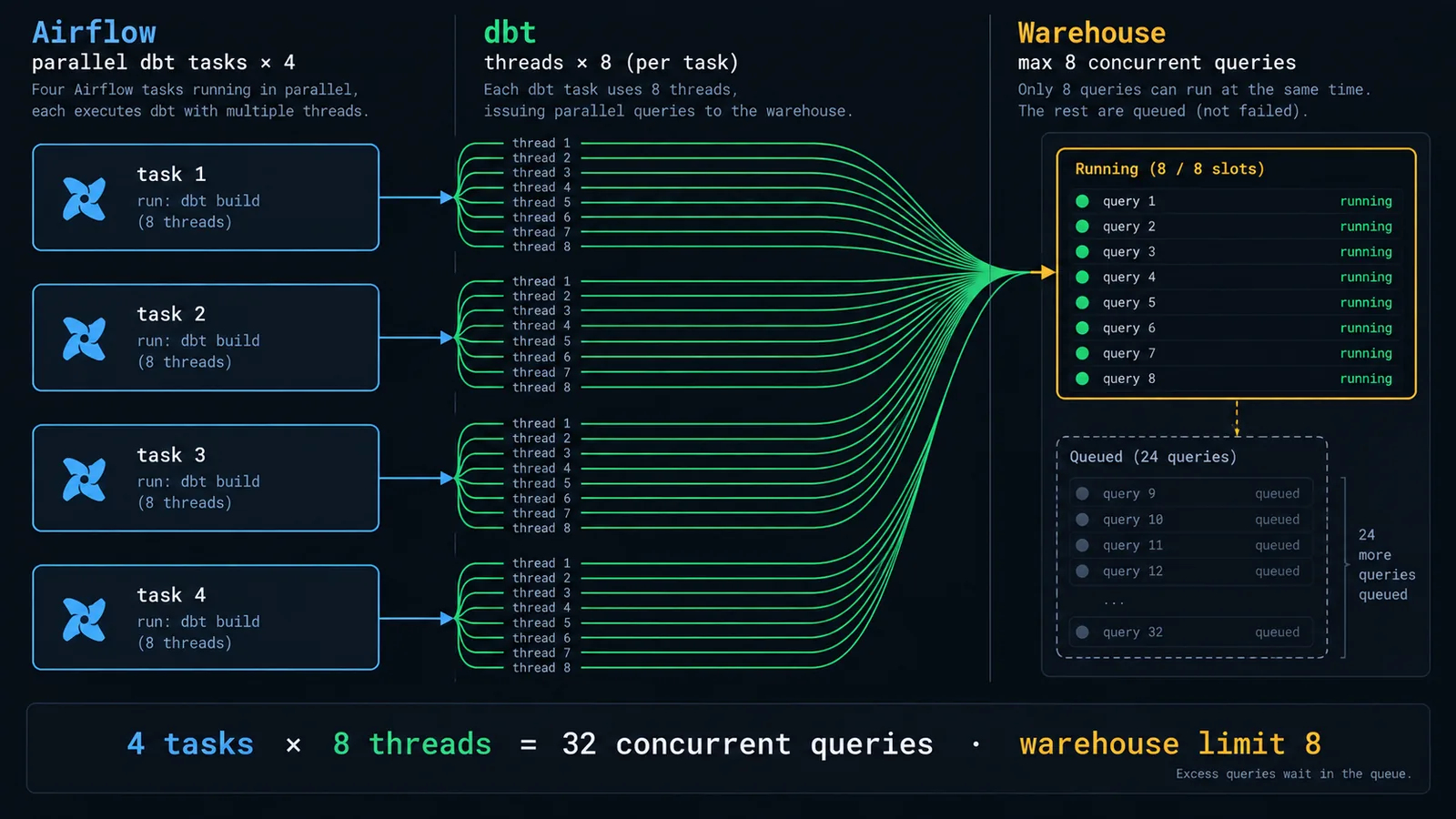
Here is the calculation that causes more warehouse incidents than any other. dbt's threads setting controls how many models it builds in parallel within one invocation. Airflow's parallelism controls how many invocations run at once. These multiply.
concurrent warehouse queries
    = (parallel dbt tasks) × (threads per task)

  pattern 02, four domain tasks in parallel × 8 threads = 32
  pattern 03, Cosmos, 16 concurrent model tasks × 1 thread = 16
  pattern 01, one task × 12 threads = 12

Snowflake MAX_CONCURRENCY_LEVEL default = 8 per warehouse
→ queries above the limit queue, they don't fail
→ so the symptom is "dbt got slow", not "dbt errored"
That last line is what makes this hard to diagnose. Over-parallelising doesn't produce an error message. It produces a run that took forty minutes instead of twelve, with every model reporting a duration that includes queue time, so the slowness appears to be spread evenly across the project rather than concentrated anywhere you can fix.
The fix is to decide where your concurrency lives and keep it in one place. With per-model tasks, set threads: 1 in the profile and let Airflow's pool do the throttling — two independent parallelism knobs are one too many. With coarse tasks, do the opposite: let dbt's threads handle parallelism and keep the number of concurrent dbt tasks small. Then size the pool so the product lands at or just under your warehouse's concurrency level.
It's also worth remembering that more parallelism stops helping well before it stops being possible. A dbt DAG has a critical path, and once you have enough threads to keep that path saturated, additional threads only add queue contention.
Failures, Retries, and Knowing What Happened
The naive retry re-runs everything, which on a ninety-minute build is close to useless. dbt has better options, and they're underused.
Retrying only what failed
dbt retry reads the previous run_results.json and resumes from the point of failure, re-running the failed nodes and everything downstream of them that got skipped:
# resume the last invocation from where it broke
dbt retry --target prod

# or select failures explicitly, plus their descendants
dbt build --target prod \
  --select "result:error+" "result:fail+" \
  --state ./target
Wiring this into Airflow means the first attempt runs dbt build and the retry runs dbt retry, which you can express with a templated command that checks the try number. The requirement is that target/ persists between attempts — trivial on a local executor, and something you have to plan for with containers, where it usually means writing artifacts to object storage at the end of every run.
Failing fast, and warning behaviour
Two flags shape how a failing run behaves:
# stop at the first failure instead of finishing the batch
dbt build --fail-fast

# treat warnings as errors — good for CI, dangerous in prod
dbt build --warn-error

# promote only specific warnings
dbt build --warn-error-options '{"error": ["NoNodesForSelectionCriteria"]}'
--fail-fast saves warehouse spend when a failure is systemic — a permissions change or a missing source will fail every model, and there's no value in discovering that four hundred times. It's the wrong choice when failures are typically isolated, because you learn about one broken model per run instead of all of them.
That third flag is worth knowing about specifically: NoNodesForSelectionCriteria as a warning means a task whose selector matches nothing exits successfully having done absolutely nothing. A DAG that's been quietly building zero models since someone renamed a tag is a genuinely common and genuinely expensive bug.
Making runs observable
Every dbt invocation writes run_results.json containing per-node status, timing, and row counts. Loading it into your warehouse after each run gives you a history table that answers questions logs can't:
@task(trigger_rule="all_done")
def load_run_results(**context):
    import json, pathlib
    path = pathlib.Path(DBT_DIR) / "target/run_results.json"
    if not path.exists():
        return
    results = json.loads(path.read_text())
    rows = [
        {
            "dag_run_id": context["run_id"],
            "node": r["unique_id"],
            "status": r["status"],
            "runtime_seconds": r["execution_time"],
        }
        for r in results["results"]
    ]
    write_to_warehouse("meta.dbt_run_results", rows)
trigger_rule="all_done" is the point — you want these artifacts most when the run failed, so the capture task must run regardless of upstream state. With a few weeks of that table you can answer which models are getting slower, which tests fail intermittently, and where the critical path actually is, none of which is visible from a green checkmark.
Slim CI and Deferral
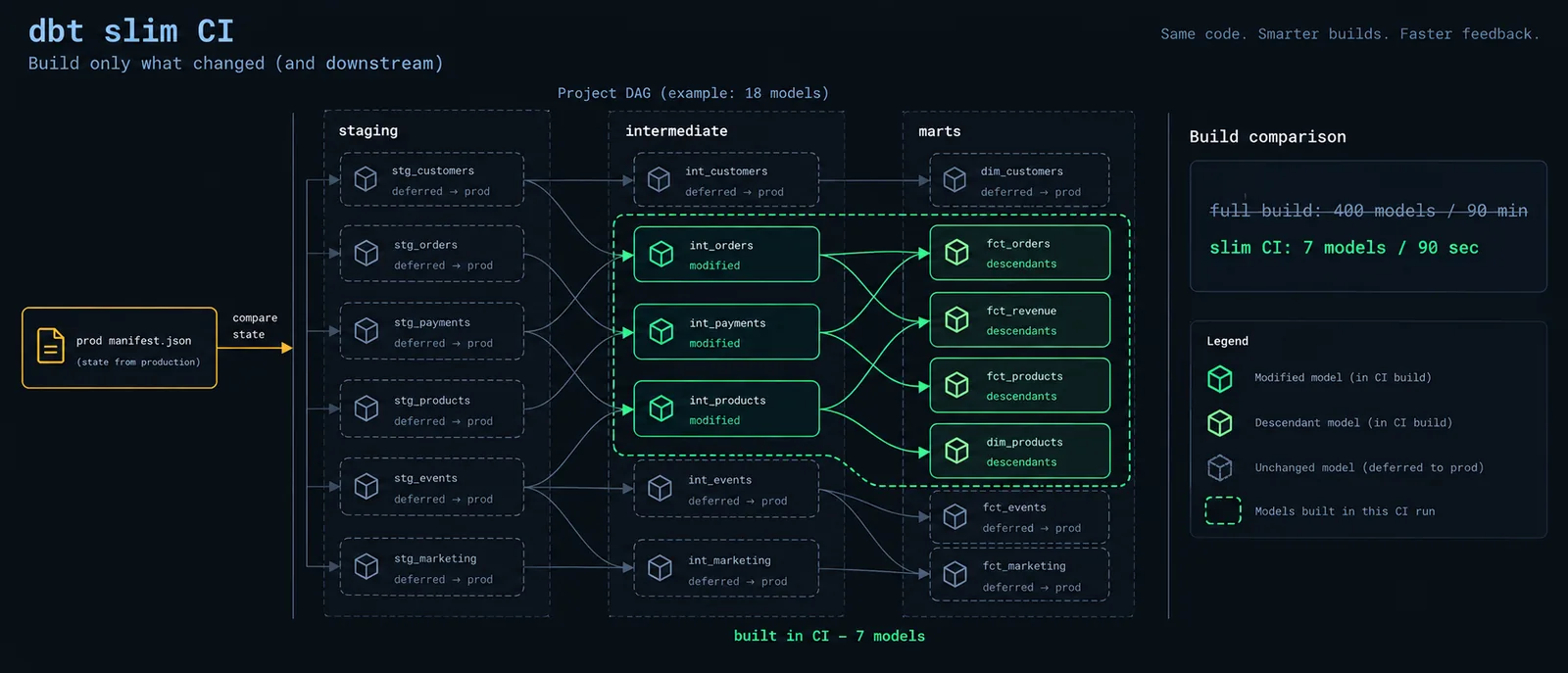
Airflow runs production; CI is what keeps production from breaking. The technique that makes dbt CI fast is state comparison: build only what changed, and read everything else from production.
# fetch the manifest from the last successful production run
aws s3 cp s3://data-artifacts/dbt/prod/manifest.json ./prod-artifacts/

dbt deps

# build modified models and their children only
dbt build --target ci \
  --select "state:modified+" \
  --defer --state ./prod-artifacts \
  --favor-state
Three flags, three distinct jobs. state:modified+ selects models whose definition changed, plus everything downstream. --defer --state tells dbt that any unselected ref() should resolve to the production relation rather than failing on a missing table in the empty CI schema. --favor-state resolves ambiguity toward production when a stale object happens to exist in the CI schema.
The result is a CI run that builds six models instead of four hundred, in ninety seconds instead of ninety minutes, while still testing them against real production-scale data upstream.
Airflow's part of this contract is producing the manifest. A final task on the production DAG uploads target/manifest.json to a known location, and CI pulls it. If that upload is unreliable, CI silently loses the ability to compare state and starts rebuilding everything — so the upload task should be monitored like any other production dependency, not treated as a convenience.
publish_manifest = BashOperator(
    task_id="publish_manifest",
    bash_command=(
        f"aws s3 cp {DBT_DIR}/target/manifest.json "
        "s3://data-artifacts/dbt/prod/manifest.json"
    ),
    trigger_rule="all_success",
)
A Decision Framework
Working through the choice for a given project:
Under ~100 models, full build finishes in under 20 minutes, small team? → One task, one dbt build. Do not add machinery you don't need yet.
100–500 models, clear layer or domain boundaries, want localized failures? → Task groups by selector, plus a CI check that catches cross-domain refs your DAG doesn't model.
Need per-model visibility, retries, and SLAs in Airflow's own UI? → Cosmos with LoadMode.DBT_MANIFEST and a manifest built in CI.
dbt dependencies conflict with Airflow, or teams need independent release cycles? → Containerized execution with pinned image tags.
Multiple teams, different SLAs, different owners on one dbt project? → Separate DAGs per domain, connected by assets.
Already on dbt Cloud with jobs defined there? → Trigger via the provider with deferrable=True, and accept that debugging happens in dbt Cloud.
Not sure which? → Start at 01, move to 02 when a failure costs you a full re-run, and only go to 03 when per-model visibility is something people are actively asking for.
Common Mistakes
Running dbt commands during DAG parsing. Anything that shells out to dbt at module level — dbt ls, dbt compile, reading a manifest that has to be generated first — runs on every scheduler parse cycle, every thirty seconds, for every DAG. It's the most reliable way to take a scheduler down.
Leaving catchup=True with an old start date. One deploy, hundreds of queued runs, all hitting the warehouse at once. Set it to False and backfill deliberately when you mean to.
Multiplying parallelism without noticing. Eight Airflow tasks each running dbt with eight threads is sixty-four concurrent queries against a warehouse configured for eight. Nothing errors; everything just gets slower.
Ignoring the second copy of the DAG. Any pattern with hand-written task dependencies has a second representation of dbt's graph, and it will drift. Either enforce the boundary in CI or generate the tasks from the manifest.
Using dbt run and dbt test as separate sequential tasks. Every model builds before any test runs, so a broken staging model propagates through the entire project before anything catches it. dbt build interleaves them.
Not persisting target/ artifacts. Without them there's no dbt retry, no state comparison in CI, and no run history. In containerized setups this needs explicit design, not a hope that the filesystem sticks around.
Retrying non-transient failures. Three retries on a SQL syntax error costs three full warehouse runs to arrive at the same failure. Keep retry counts low and lean on dbt retry for resumption rather than blanket re-runs.
Selectors that match nothing. A renamed tag turns a green task into a no-op. Promote NoNodesForSelectionCriteria to an error so the pipeline tells you instead of pretending.
Putting It Together: A Realistic Layout
How a mid-sized setup typically looks once it's settled:
repo/
├── dags/
│   ├── dbt_core_daily.py        -- staging + core, 03:00, publishes asset
│   ├── dbt_finance_daily.py     -- asset-triggered, finance team owns
│   ├── dbt_product_daily.py     -- asset-triggered, product team owns
│   ├── dbt_events_hourly.py     -- incremental events, top of each hour
│   └── utils/dbt_helpers.py     -- shared task factory + pool defaults
├── dbt/analytics/
│   ├── dbt_project.yml          -- tags by schedule AND domain
│   ├── selectors.yml            -- named selections the DAGs reference
│   ├── profiles.yml             -- dev / ci / prod, all env_var
│   ├── packages.yml
│   └── models/{staging,intermediate,marts}/
└── .github/workflows/
    ├── dbt-ci.yml               -- state:modified+ with --defer
└── publish-manifest.yml -- dbt parse on merge to mainschedule
├── 03:00 dbt_core_daily pool=snowflake_transform (6), threads=8
├── ↳ dbt_finance_daily triggered by asset core_ready
├── ↳ dbt_product_daily triggered by asset core_ready
└── :05 dbt_events_hourly max_active_runs=1, threads=4
after every prod run
├── publish target/manifest.json → s3://data-artifacts/dbt/prod/
└── load target/run_results.json → meta.dbt_run_results
on failure
├── on_failure_callback → #data-alerts, with log URL
└── retry 1 runs `dbt retry`, not a full rebuildThe reasoning: core is the shared dependency, so it runs on a clock and everything else waits on its asset rather than guessing at a safe offset. Finance and product are owned by different teams and fail independently, which is the whole point of splitting them. Events run hourly with their own smaller thread count because they're incremental and small, and they're capped at one active run because concurrent incremental builds on the same table is a correctness hazard.
The two artifact tasks are the unglamorous parts that make everything else work. Without the manifest upload, CI degrades to full builds and nobody notices for weeks. Without run results, you have no way to see the pipeline getting slower until someone complains that the morning dashboard is late.
This shape scales to a few hundred models comfortably. Past that, the usual next step isn't a more complex DAG — it's moving to per-model generation with Cosmos, at which point the domain DAGs above become render configs over different selectors and the operational contract stays essentially the same.
Wrapping Up
Orchestrating dbt with Airflow is mostly a question of how much of dbt's graph you duplicate into Airflow, and every answer trades visibility against maintenance. One task is simple and opaque. Per-model tasks are transparent and require a manifest pipeline you now own. Task groups sit in the middle and ask you to defend a boundary that dbt doesn't enforce for you.
What doesn't change across patterns is the configuration underneath. Tag models by schedule as well as subject. Keep selection logic in selectors.yml where the people who own the models can change it. Keep secrets in environment variables sourced from a secrets backend. Set catchup=False, cap max_active_runs, use pools, and do the concurrency multiplication before your warehouse does it for you. Persist your artifacts so retries can be surgical and CI can be slim.
Get those right and the choice of pattern becomes reversible — which is the real goal, because the right pattern for a hundred-model project is genuinely not the right one for five hundred, and you'd rather migrate than rebuild.
— This article is part of an ongoing tooling series on techedge.in. Running dbt on Airflow and hitting something strange? Drop a comment, I read every one.
One email, every other week.
New posts on data engineering, applied AI, and the business decisions around them. No noise, unsubscribe anytime.
Comments
All comments are reviewed before they appear publicly — this keeps spam out.
Loading comments…