Apache Iceberg: A Practical Guide to the Open Table Format
Metadata layers, hidden partitioning, snapshots, branches, and the copy-on-write versus merge-on-read decision — what Iceberg actually does to your files, and where teams get it wrong.
Most teams meet Apache Iceberg the same way: someone in a planning meeting says "we should move the lake to Iceberg," everyone nods, and six weeks later you have tables that technically work but query slower than the Parquet directories they replaced. The format itself isn't the problem. What usually happens is that Iceberg gets adopted as a file layout when it's actually a set of guarantees — and those guarantees come with operational obligations nobody mentioned in the planning meeting.
This is a practical walkthrough of what Iceberg genuinely gives you, what it costs, and what you have to do to keep it fast. We'll cover the metadata tree that makes everything else possible, hidden partitioning and partition evolution, schema evolution, snapshots and time travel, branching and tagging, the copy-on-write versus merge-on-read decision, catalogs, and the maintenance jobs that separate a healthy Iceberg table from an expensive one.
What Iceberg Actually Is (and Isn't)
Iceberg is a table format. It is not a storage engine, not a query engine, and not a file format. Your data still lives as ordinary Parquet, ORC, or Avro files in object storage. What Iceberg adds is a precise, versioned description of which files make up the table right now — and that one addition is what unlocks everything else.
To understand why that matters, it helps to remember what it replaced. In the Hive table format, a table was defined as "whatever files happen to be under this directory prefix." The list of files was discovered by listing directories at query time, and partitions were literally folder names. That design had three chronic problems: listing millions of prefixes on S3 is slow and eventually-consistent; there's no way to change a row without rewriting a whole partition; and two writers touching the same table at the same time can quietly corrupt each other's output because nothing is atomic.
Iceberg's answer is to stop discovering and start declaring. Every file belonging to the table is recorded explicitly in metadata, along with its row count, column-level minimum and maximum values, null counts, and partition values. Query planning becomes reading metadata rather than crawling storage. A commit becomes swapping one pointer. Concurrency becomes optimistic locking with retries, the same way a database does it.
The project came out of Netflix, was donated to the Apache Software Foundation, and became a top-level project in 2020. Since then it has become the de facto interchange format for lakehouse architectures, which is really its most important property: the same table can be read by Spark, Trino, Flink, Snowflake, BigQuery, DuckDB, and others without anyone exporting anything.
The Metadata Tree: Four Layers Worth Knowing
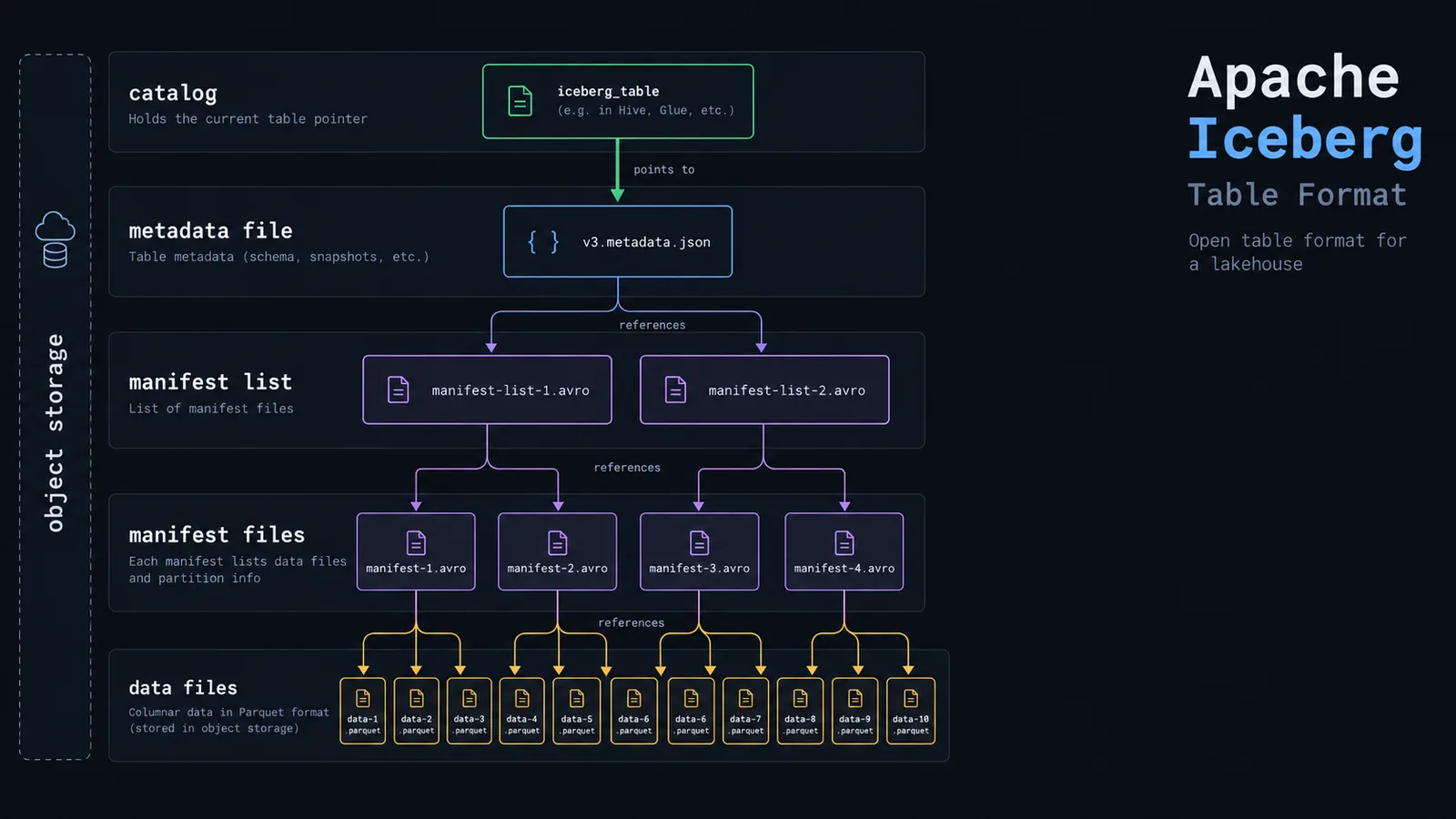
You don't need to read Avro manifests by hand to run Iceberg well, but you do need the mental model, because almost every performance problem you'll hit is explained by it.
From the top down, there are four layers. The catalog holds exactly one thing per table: a pointer to the current metadata file. Swapping that pointer atomically is what "committing" means. The metadata file (a JSON document) holds the table's schema history, partition specs, sort orders, table properties, and the full list of snapshots. Each snapshot points to a manifest list, an Avro file naming every manifest in that version of the table, with partition range summaries so entire manifests can be skipped. Each manifest file lists actual data files, with per-file statistics.
s3://company-lakehouse/warehouse/analytics/events/
├── metadata/
│   ├── v3.metadata.json                      -- schema, specs, snapshot list
│   ├── snap-3821550127947089009-1-a91.avro   -- manifest list (one per snapshot)
│   ├── a91f0c-m0.avro                        -- manifest file
│   └── a91f0c-m1.avro
└── data/
    └── event_ts_day=2026-09-14/
        ├── 00000-14-f2b8c1d9.parquet
        └── 00001-14-7ae03b52.parquet
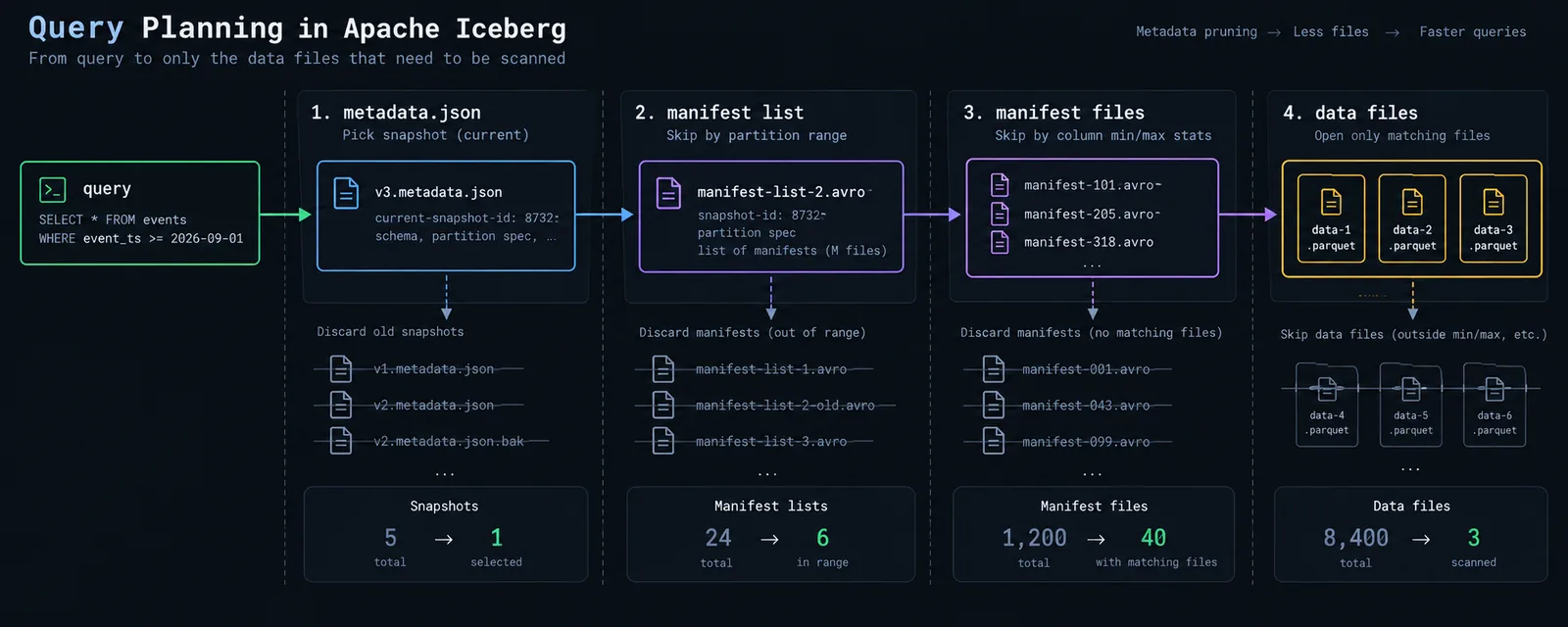
When a query arrives, the engine reads the metadata file, picks a snapshot, reads the manifest list, discards manifests whose partition ranges can't match the predicate, then reads the surviving manifests and discards individual files whose column min/max stats can't match. Only then does it open Parquet files. On a table with a hundred thousand files, a well-filtered query might open forty of them, and it figured that out without touching storage beyond a few small metadata reads.
This is also why the maintenance section later in this article isn't optional. Every write creates new manifests. Every snapshot is retained until you expire it. Left alone, a table written to every five minutes accumulates metadata faster than data, and planning time — the part that was supposed to be instant — becomes the bottleneck.
Hidden Partitioning: The Feature Everyone Undersells
In a Hive-style table, if you partition by date you must also store a date column, and every analyst must remember to filter on it. Filter on the timestamp instead of the derived date column and you get a full table scan, correct results, and a surprising bill.
Iceberg decouples the two. You declare a partition transform over a real column, and Iceberg records the relationship in metadata. Queries filter on the real column; Iceberg derives the partition filter itself.
CREATE TABLE analytics.events (
    event_id     STRING,
    user_id      STRING,
    event_type   STRING,
    event_ts     TIMESTAMP,
    country      STRING
)
USING iceberg
PARTITIONED BY (days(event_ts))
TBLPROPERTIES (
    'write.format.default' = 'parquet',
    'write.target-file-size-bytes' = '536870912'
);
Now this query prunes partitions correctly, with no derived column anywhere in sight:
SELECT event_type, count(*)
FROM analytics.events
WHERE event_ts >= TIMESTAMP '2026-09-01 00:00:00'
GROUP BY 1;
The available transforms are identity, year, month, day, hour, bucket(N, col), and truncate(N, col). bucket is the one people forget: it hashes a high-cardinality column into a fixed number of buckets, which is how you get join-friendly distribution on something like user_id without creating a million directories.
partition evolution
The second half of the feature is that partitioning isn't permanent. Because partition values are stored per file in metadata rather than encoded in the directory path, you can change the spec without rewriting history:
ALTER TABLE analytics.events ADD PARTITION FIELD bucket(16, user_id);

-- or move from daily to hourly as volume grows
ALTER TABLE analytics.events DROP PARTITION FIELD days(event_ts);
ALTER TABLE analytics.events ADD PARTITION FIELD hours(event_ts);
Old files keep their old partition spec; new writes use the new one. A query spanning both eras plans against each spec separately and unions the result. In a Hive table, the equivalent change meant rewriting years of data or creating a second table and a view over both.
where it breaks down
Hidden partitioning removes the requirement to think about partitions, not the consequences of choosing badly. Partitioning hourly on a table receiving a few thousand rows an hour produces thousands of tiny files and slower queries than no partitioning at all. The rule of thumb hasn't changed: aim for partitions measured in hundreds of megabytes to a few gigabytes, not megabytes.
Schema Evolution That Doesn't Corrupt Anything
Iceberg tracks every column by a stable numeric field ID rather than by name or by position in the file. That sounds like a footnote and is actually the difference between schema changes being routine and being a migration project.
ALTER TABLE analytics.events ADD COLUMN session_id STRING;
ALTER TABLE analytics.events RENAME COLUMN country TO country_code;
ALTER TABLE analytics.events ALTER COLUMN events_count TYPE BIGINT;
ALTER TABLE analytics.events DROP COLUMN legacy_flag;
None of these rewrite a single data file. A renamed column keeps its field ID, so old Parquet files still resolve correctly. A dropped column is simply no longer projected. A new column reads as null for files written before it existed. And because resolution is by ID, you can't accidentally resurrect a dropped column's data by adding a new column with the same name — a genuinely nasty failure mode in positional formats.
Type promotion is deliberately conservative: widening is allowed (int to long, float to double, decimal precision increases), narrowing is not. If you need a narrowing change or a semantic type change, that's a rewrite, and Iceberg makes you do it explicitly rather than silently producing wrong values.
the caveat
Schema evolution protects the table, not your consumers. Renaming a column is safe for Iceberg and breaks every dashboard, dbt model, and notebook referencing the old name. Treat renames as contract changes with the same communication you'd give an API break.
Snapshots and Time Travel
Every write to an Iceberg table produces a new snapshot rather than mutating the current one. The old snapshot still exists, still references its files, and remains queryable until you explicitly expire it. Time travel isn't a bolt-on feature — it's a side effect of how commits work.
-- by snapshot id
SELECT * FROM analytics.events VERSION AS OF 3821550127947089009;

-- by wall-clock time
SELECT * FROM analytics.events
TIMESTAMP AS OF '2026-09-10 06:00:00';

-- what snapshots exist, and what each one did
SELECT * FROM analytics.events.snapshots ORDER BY committed_at DESC;
SELECT * FROM analytics.events.history;
Those metadata tables are the most underused debugging tool in the whole format. snapshots gives you the operation type (append, overwrite, delete), a summary with added and removed record counts, and the snapshot ID. When someone reports that yesterday's numbers changed, you can find the exact commit that changed them and diff the table against itself across two snapshots.
Rollback is the operational counterpart. If a bad job overwrites a table with garbage, you don't restore from backup — you point the table back at the last good snapshot:
CALL analytics_cat.system.rollback_to_snapshot(
  'analytics.events',
  3821550127947089009
);
The constraint: time travel only reaches as far back as your retained snapshots, and retaining snapshots costs storage because the files they reference can't be deleted. The default retention in Iceberg is on the order of a few days. Decide deliberately how far back you need to go, rather than discovering the answer during an incident.
Branches and Tags: Git-Style Publishing
Because snapshots form a history, Iceberg can expose named references into that history. A tag is a stable name for one snapshot. A branch is an independent line of commits that can be written to and later merged into main.
ALTER TABLE analytics.events CREATE TAG eom_2026_08 RETAIN 365 DAYS;
ALTER TABLE analytics.events CREATE BRANCH audit RETAIN 7 DAYS;

-- write to the branch, not to main
INSERT INTO analytics.events.branch_audit SELECT * FROM staging.events_batch;

-- read it back and validate before anyone sees it
SELECT count(*) FROM analytics.events.branch_audit;

-- publish atomically once checks pass
CALL analytics_cat.system.fast_forward('analytics.events', 'main', 'audit');
This is the write-audit-publish pattern, and it solves a problem every data team has: bad data being visible to stakeholders for the ten minutes between loading it and noticing it's wrong. With branches, the load happens off to one side, tests run against the branch, and the fast-forward makes it visible only if everything passed.
Tags cover the other half — regulatory and reproducibility needs. Tagging the snapshot used to produce a quarterly filing means you can reproduce that exact report in two years, even though the underlying table has been updated ten thousand times since.
the caveat
Branch and tag support is strongest in Spark; other engines vary in how much branch DDL they expose, and some can read a branch but not write to one. Check your engine before designing a pipeline around it.
Row-Level Changes: Copy-on-Write vs. Merge-on-Read
Iceberg supports UPDATE, DELETE, and MERGE INTO on data sitting in object storage — files that are fundamentally immutable. There are only two ways to make that work, and choosing between them is the single highest-impact configuration decision in an Iceberg table.
MERGE INTO analytics.orders t
USING staging.order_updates s
ON t.order_id = s.order_id
WHEN MATCHED THEN UPDATE SET *
WHEN NOT MATCHED THEN INSERT *;
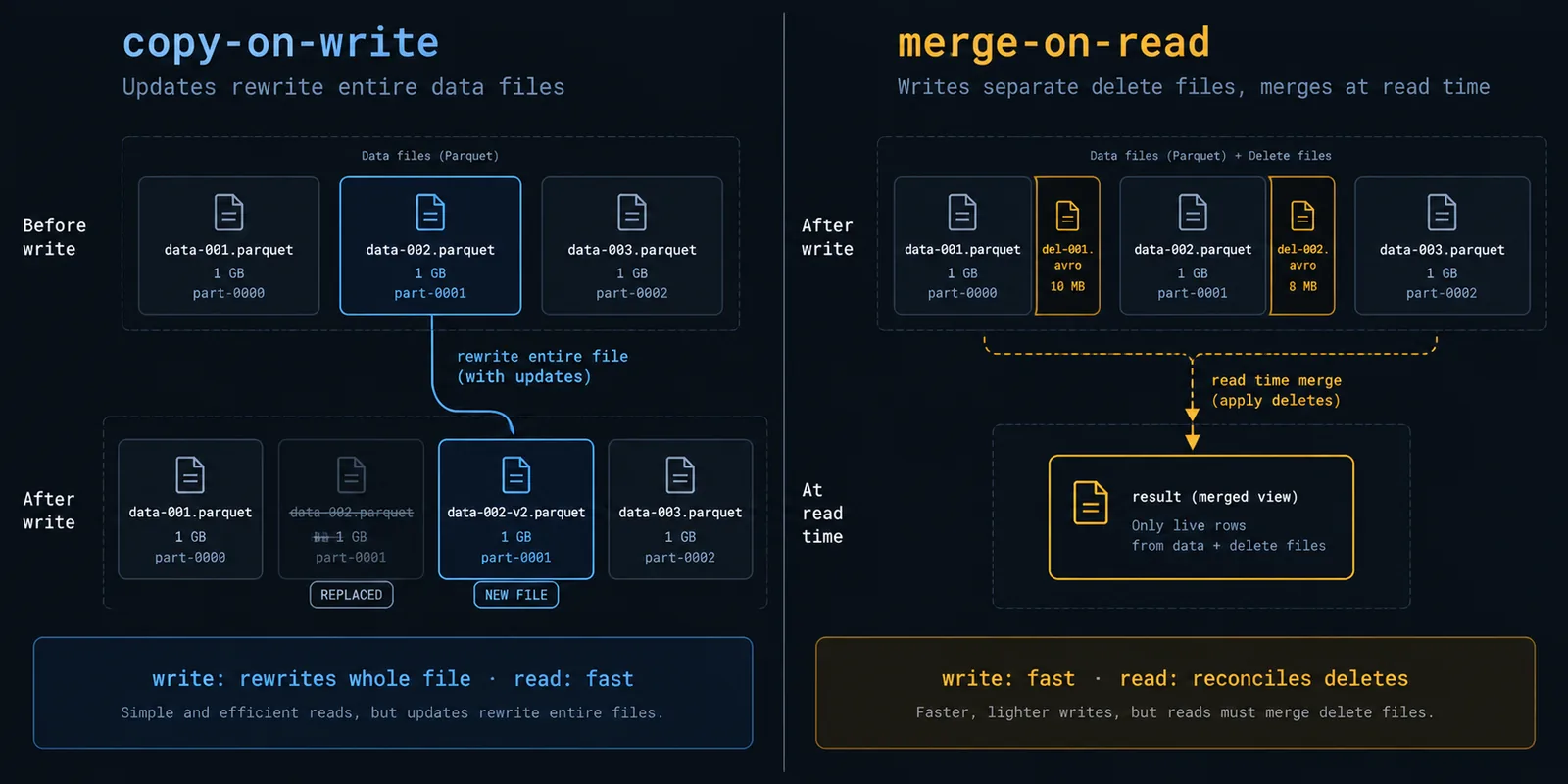
Copy-on-write is the default. When a row changes, Iceberg rewrites every data file containing an affected row, with the change applied. Writes are expensive — changing one row in a 512 MB file rewrites all 512 MB — but reads are as fast as a plain Parquet scan, because there's nothing extra to reconcile.
Merge-on-read leaves the data files alone and writes small delete files alongside them, recording which rows are no longer valid. Writes are fast and cheap. Reads pay a reconciliation cost, because the engine has to apply deletes on the fly.
ALTER TABLE analytics.orders SET TBLPROPERTIES (
  'write.delete.mode' = 'merge-on-read',
  'write.update.mode' = 'merge-on-read',
  'write.merge.mode'  = 'merge-on-read'
);
Note that the three operations are configured independently. A perfectly reasonable setup is merge-on-read for frequent CDC-driven updates and copy-on-write for rare bulk deletes.
The practical guidance is about write frequency versus read frequency. If a table is updated a handful of times per day and queried constantly, copy-on-write: pay once at write time, keep reads clean. If a table absorbs streaming upserts every few minutes, merge-on-read: copy-on-write would spend its life rewriting files. Anything in between, start with copy-on-write and switch only when write latency becomes a real complaint.
where people get burned
Merge-on-read is not free — it's deferred. Delete files accumulate, and every read pays to apply them. A streaming table on merge-on-read with no compaction schedule gets measurably slower every day until someone investigates and finds tens of thousands of delete files. If you choose merge-on-read, you are also choosing to run compaction on a schedule. Treat them as a single decision, not two.
Catalogs: The Part People Skip and Regret
The catalog is the component that tracks, for each table, which metadata file is current. It's a small job and an absolutely critical one: it's where atomicity comes from, and it's the thing that decides whether your tables are genuinely shareable across engines or just theoretically shareable.
spark.sql.catalog.analytics            org.apache.iceberg.spark.SparkCatalog
spark.sql.catalog.analytics.type       rest
spark.sql.catalog.analytics.uri        https://catalog.internal:8181
spark.sql.catalog.analytics.warehouse  s3://company-lakehouse/warehouse
spark.sql.catalog.analytics.io-impl    org.apache.iceberg.aws.s3.S3FileIO
spark.sql.extensions                   org.apache.iceberg.spark.extensions.IcebergSparkSessionExtensions
The main options in practice:
- REST catalog — a specification rather than an implementation, and the direction the ecosystem has converged on. Engines speak one protocol; the catalog handles credential vending, and implementations are broadly interchangeable.
- AWS Glue — the path of least resistance on AWS, with native Athena and EMR integration. Fine within AWS, awkward outside it.
- Hive Metastore — works, widely deployed, and mostly a migration story rather than a choice anyone makes fresh today.
- Nessie — adds catalog-level branching across multiple tables, so you can version a whole set of tables together rather than one at a time.
- Polaris and vendor catalogs — REST-compatible catalogs from the warehouse vendors, typically with governance and access control layered on top.
- Hadoop/filesystem catalog — no external service, atomicity depending on filesystem rename semantics. Fine for local development, genuinely unsafe for concurrent production writes on object storage.
The mistake to avoid is running two catalogs over the same storage — say, Glue for the Spark jobs and something else for the query engine. The moment two systems each believe they own the current metadata pointer, you've lost the atomicity guarantee that was the entire reason for adopting Iceberg. One table, one catalog, no exceptions.
Maintenance You Genuinely Cannot Skip
This is the section that would have saved most struggling Iceberg deployments. The format gives you correctness and flexibility; it does not give you a self-tuning table. Four jobs need to run on a schedule.
Compaction
Streaming writes and frequent small batches produce many small files. Small files mean more manifest entries, more open calls, and worse compression. rewrite_data_files bin-packs them into target-sized files, and can sort while it's at it:
CALL analytics_cat.system.rewrite_data_files(
  table   => 'analytics.events',
  strategy => 'sort',
  sort_order => 'event_ts DESC NULLS LAST, user_id',
  options => map(
    'min-input-files', '5',
    'target-file-size-bytes', '536870912',
    'partial-progress.enabled', 'true'
  )
);
Sorting during compaction is the cheapest performance win available, because it tightens per-file min/max statistics, which directly improves how many files can be skipped at planning time. If you compact anyway, sort on your most common filter column while you're there.
Expiring snapshots
Snapshots pin files. Until a snapshot is expired, none of the files it references can be deleted, even if they were logically replaced months ago. Expiry is what actually reclaims storage:
CALL analytics_cat.system.expire_snapshots(
  table       => 'analytics.events',
  older_than  => TIMESTAMP '2026-09-07 00:00:00',
  retain_last => 10
);
Set the window against your actual recovery and time-travel needs. Seven days covers most operational rollback scenarios; anything you need for longer should be pinned with a tag rather than kept alive by a blanket retention policy.
Removing orphan files
Failed writes leave data files in storage that no snapshot references. They cost money and nothing else. remove_orphan_files finds and deletes them — but it works by comparing storage contents against metadata, so a file from a commit that's still in flight looks identical to an orphan. Always use a conservative older_than, typically three days or more, never a few hours.
Rewriting manifests
Frequent commits fragment manifests, which slows planning even when the data files are healthy. rewrite_manifests reorganizes them so partition-level pruning works efficiently again. Weekly or monthly is usually enough on tables that aren't written continuously.
CALL analytics_cat.system.remove_orphan_files(
  table      => 'analytics.events',
  older_than => TIMESTAMP '2026-09-10 00:00:00'
);

CALL analytics_cat.system.rewrite_manifests('analytics.events');

-- merge-on-read tables: compact accumulated delete files too
CALL analytics_cat.system.rewrite_position_delete_files(
  table => 'analytics.orders'
);
Some managed platforms now run a version of this automatically for tables they own. That's convenient and worth using — but confirm it's actually running rather than assuming it is, because the symptom of it not running is gradual, not sudden.
Engine-Specific Behavior Worth Knowing
Iceberg is a shared format, but support is uneven. What you can do depends heavily on what's reading and writing:
| Engine | Notable behavior |
|---|---|
| Spark | The reference implementation. Most complete writes, all maintenance procedures, branch and tag DDL. If a feature exists, it exists here first. |
| Flink | The standard streaming writer, including CDC upserts. Produces many small files by design — compaction scheduling is mandatory, not optional. |
| Trino | Excellent reads and full MERGE support; maintenance is exposed through ALTER TABLE ... EXECUTE rather than Spark-style procedures. |
| Snowflake | Reads and writes when it owns the catalog; read-focused when an external catalog does. Which side of that line you're on determines a lot. |
| BigQuery | Reads external Iceberg tables, and offers its own managed Iceberg tables with automatic storage optimization. Still billed by bytes scanned, so pruning matters. |
| DuckDB / ClickHouse | Read-oriented, and superb for ad-hoc analysis or local development against production tables without touching a cluster. |
The takeaway: decide early which engine is the writer and which are readers. Multi-engine reads are Iceberg's strongest guarantee and generally work as advertised. Multi-engine writes work too, but only if every writer shares one catalog and you've verified each one supports the operations your pipeline depends on.
A Decision Framework
A practical way to work through choices for a given table:
Append-only files read occasionally by exactly one engine, never updated? → Plain partitioned Parquet is genuinely fine. Iceberg earns its complexity through mutation, multi-engine access, or schema churn.
Multiple engines need the same data without copies? → Iceberg with a REST-compatible catalog. This is the strongest case for adoption.
High-volume event stream, append-heavy, rarely updated? → Partition by days(), copy-on-write, and prioritize compaction with a sort on your main filter column.
CDC feed with constant small upserts and deletes? → Merge-on-read, plus a scheduled delete-file compaction job in the same breath.
Dimension table rebuilt nightly with occasional corrections? → Copy-on-write. Write cost is irrelevant at that frequency, and reads stay clean.
Bad data must never be visible to stakeholders, even briefly? → Write to a branch, validate, then fast-forward to main.
Need to reproduce a specific report months or years later? → Tag the snapshot at publish time. Don't rely on a retention window to still be there.
Common Mistakes
The patterns that show up repeatedly in real deployments:
No compaction schedule. The most common cause of "Iceberg made our queries slower." Small files accumulate, planning bloats, scans fragment. Schedule compaction on day one, not after the first complaint.
Never expiring snapshots. Storage grows without bound because nothing can be deleted while a snapshot references it, and metadata reads get slower as the snapshot list grows.
Over-partitioning. Hourly partitions on a modest table, or an identity partition on a high-cardinality column, produces thousands of tiny partitions and defeats the point of partitioning entirely.
Merge-on-read without delete compaction. Read latency degrades a little every day. It's slow enough to look like general platform drift rather than a specific fixable cause.
Touching files directly in object storage. Deleting or moving a data file behind Iceberg's back leaves metadata pointing at something that no longer exists, and queries fail. Storage is Iceberg's to manage now.
Two catalogs over one table. Splits the source of truth and forfeits atomic commits — the guarantee you adopted Iceberg for in the first place.
Aggressive orphan-file cleanup. Running remove_orphan_files with a short window while writes are in flight can delete files belonging to an uncommitted job. Keep the threshold generous.
Putting It Together: A Realistic Lakehouse Layout
How these choices typically play out across a real project's layers:
analytics_cat  (REST catalog → s3://company-lakehouse/warehouse)

raw/
├── events            -- days(event_ts) · copy-on-write · append-only, Flink writer
└── orders_cdc        -- days(ingested_at) · merge-on-read · Debezium upserts

core/
├── fct_events        -- days(event_ts), bucket(16, user_id) · sorted compaction daily
├── fct_orders        -- days(order_date) · merge-on-read + delete compaction
└── dim_customers     -- unpartitioned · copy-on-write · rebuilt nightly

marts/
└── agg_daily_revenue -- days(order_date) · copy-on-write · branch + fast-forward publish

maintenance schedule
├── hourly   → rewrite_data_files on raw/orders_cdc
├── daily    → rewrite_data_files (sort) on core/*, expire_snapshots (7d retain)
├── weekly   → rewrite_manifests on high-churn tables
└── weekly   → remove_orphan_files (older_than 3 days)
The reasoning: raw event data is append-only and enormous, so it gets daily partitions and copy-on-write, with compaction doing the heavy lifting because Flink writes small files continuously. The CDC table is the opposite — constant small upserts make merge-on-read the only sane option, paired with hourly compaction so delete files never pile up.
In the core layer, fct_events adds a bucket transform on user_id because most downstream joins go through it, and sorted compaction keeps min/max stats tight for time-range filters. dim_customers is small enough that partitioning would only create overhead, and it's rebuilt wholesale each night, so copy-on-write costs nothing. The published mart goes through a branch because it's the one stakeholders actually look at — bad numbers there are the expensive kind.
The maintenance block is not an appendix; it's part of the design. Every materialization choice above implies a maintenance job, and the schedule is where those implications get written down. A table whose maintenance nobody owns will eventually become the table everyone complains about.
Wrapping Up
Apache Iceberg's real contribution is narrow and important: it replaces "the table is whatever files are in this folder" with an explicit, versioned, atomic description of table state. Everything people find valuable about it — time travel, schema and partition evolution, branching, safe concurrent writes, multi-engine access — follows from that one change. It is not a query accelerator, and adopting it will not by itself make anything faster.
What it does do is give you database-like guarantees over files you own, in formats you can read with anything, without lock-in to a vendor's storage layer. That's worth a lot, especially on a five-year horizon where the engines you use will probably change and the data won't.
The practical takeaway: pick one catalog and mean it, partition coarsely and let hidden partitioning handle the rest, default to copy-on-write and move to merge-on-read only where write frequency genuinely demands it, and treat compaction and snapshot expiry as pipeline components rather than cleanup chores. Get those four right and Iceberg mostly disappears into the background, which is exactly what a good table format should do.
— This article is part of an ongoing tooling series on techedge.in. Wrestling with a slow Iceberg table? Drop a comment, I read every one.
One email, every other week.
New posts on data engineering, applied AI, and the business decisions around them. No noise, unsubscribe anytime.
Comments
All comments are reviewed before they appear publicly — this keeps spam out.
Loading comments…